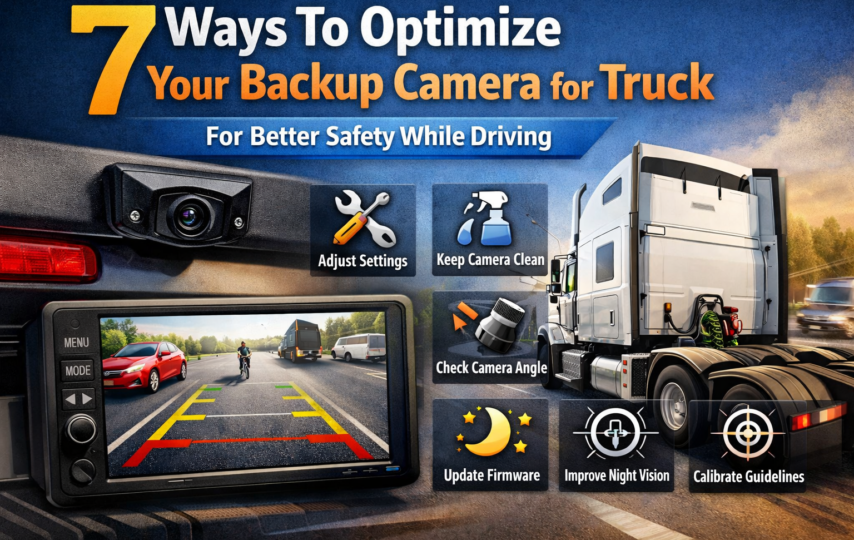

Most accidents involve trucks during reversing or low-speed maneuvers because of limited visibility.
Trucks that hang long rear overhangs, high tailgate and wide blind zones tend to create misjudged distances even for experienced drivers.
This is why a back up camera for truck is an essential part of safety and efficiency. However, if a camera is not optimized, whether it’s due to poor placement or cluttered displays, it can dramatically impact its effectiveness.
Optimizing helps ensure the driver sees what actually helps and boosts their speed as well as safety while they drive.
Looking for ways to improve your system that builds instinct and helps in reacting without second-guessing? Here is a detailed list for you to follow.
How To Optimize Your Backup Camera for a Truck?
Whether you install a semi truck camera system, which works best for a broader safety approach, or one for improving the road awareness in a truck.
Understanding what can help in improving the functions and overall results, here are some ways to help.
- Get Camera Position Right First
Camera placement is the key foundation of how your backup camera will work. A few inches off can change the depth perception or hide critical zones, leading to safety issues.
A good rule is you should see the rear edge of your truck at the bottom of the screen, but if you can’t, judging distance can be difficult.
To ensure you have the correct camera replacement, consider:
- Mount the camera high enough to capture the bumper and also the ground behind the truck.
- Avoid placement too high, as this can flatten the distance and make the object look farther away.
- Keep your lens centered to avoid skewed angles.
- Make sure your camera captures both the immediate rear and approach zone.
- Adjust Viewing Angle According To Real World Conditions
To cover more space, wide-angle lenses play a crucial rule but they can distort distance. If everything looks far away, this can cause a reaction too late.
With the right adjustments, check how a known object, like a cone or loading dock, reflects on the screen.
Do your small tweaks, and you can help in creating a bigger difference while you drive. It includes tweaks like :
- Tilt your camera slightly downward
- Avoid using extreme fisheye views if it’s not needed
- Test the view in low light and daylight conditions
- Use Guidelines As Reference Points, but Avoid Trusting Blindly
Many systems display parking or come with distance guidelines. These help, but only if they are aligned with the actual dimensions of your truck.
Combining guides, lines with mirror checks can help in improving awareness, but also don’t replace driving judgments.
Also, match the truck’s width and rear length, so you have a complete awareness. Make sure it’s visible without blocking key visual details.
- Reduce Blind Spots With Side & Arm Cameras
Rear visibility is only part of your safety equation. Large trucks have more significant blind zones along both sides, especially if you change lanes, take turns, or dock.
Here, side & arm camera systems can help in adding real value. They extend the visibility beyond the traditional mirrors.
When combined with the rear camera, your system has a more complete picture of the surroundings.
- Integrate Displays Where Your Eyes Naturally Go
A camera system should fit into the natural driving flow. If you have to look away from the road for too long, the system can end up defeating the purpose.
It includes :
- Position your screen near the dashboard or mirror line
- Avoid placing it too low or off the side
- Make sure you have visibility without glare from sunlight
- Keep the display where you can take glances to confirm behind or beside you
- Keep The Lens Clean For Clear Image
Even though it sounds obvious, it’s one of the most overlooked points. Using a dirty lens can reduce the clarity, especially if you work in heavy dust, rain, or snow.
With clear visuals, it can help in improving reaction and also be faster.
- Wipe your lens during walkarounds.
- Check for moisture or condensation.
- Inspect cables and mounts to check for any vibration damage
- Schedule your cleaning and maintenance for proper cleaning
- Adjust The Brightness & Contrast To Suit Different Light Conditions
Driving a truck in day and night creates a different visual challenge. A scene that looks fine during the day may end up with glare or wash out at night.
If your system supports automatic adjustments, still make sure you test it manually. Optimise the brightness and contrast for all lightning conditions.
For example, lower brightness for night driving, but increase contrast to highlight obstacles. Avoid over-processed images or too sharp images.
Conclusion
Optimizing your backup camera setup helps in adding better control and awareness.
When your camera shows the right view, at the right time, and in the right place, help in a predictable and less stressful way.
A well-optimized system helps in supporting side visibility and smart habits to move with confidence in unpredictable conditions.
We at Rear View Safety bring you a system that helps in enhancing your fleet protection to the finest.
From backup cameras to advanced AI camera technology, get an easy way to install and utilize the innovative camera system made for commercial trucks.
FAQs
How should I position the backup camera on the truck for the best visibility?
Mount the camera high enough to see the rear edge of the truck, but a slightly downward angle works best.
When should you consider adding a side or arm camera system to a truck?
Side and arm cameras help fill mirrors that leave blind spots, especially trailer rides, near rear wheels, or during tight turns.
Why does distance look different on the truck backup camera screen?
Wide-angle lenses can make objects appear farther away than they actually are. Adjusting the angle and using reference points like the rear bumper, visible on screen.