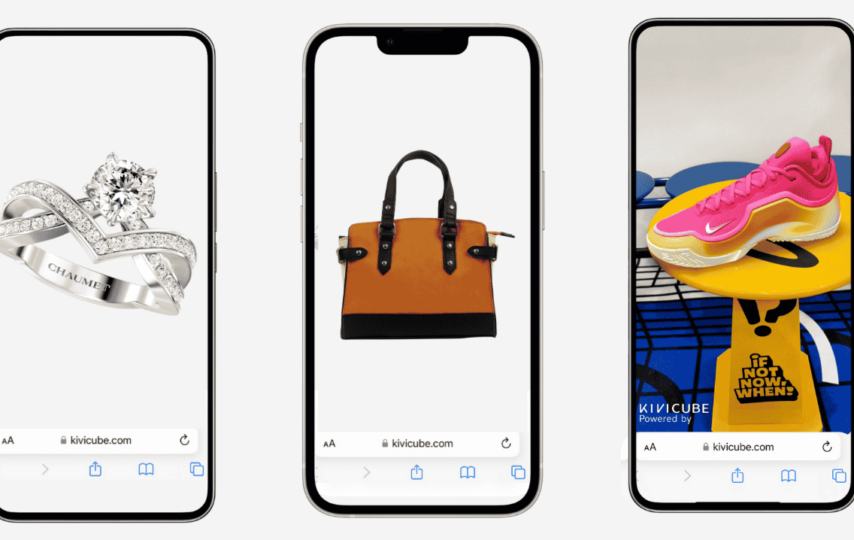

Augmented Reality (AR) is changing how businesses, educators, and organizations engage with their audiences. Instead of static content, AR transforms everyday objects, printed materials, and digital experiences into immersive, interactive environments. Today, creating professional AR experiences no longer requires advanced programming skills. Platforms like Kivicube make it possible to build, publish, and share interactive AR content entirely online using a visual, no-code editor.
Why Create AR Online?
Online AR creation platforms eliminate the complexity traditionally associated with AR development. Instead of writing code or installing complicated software, users can build complete AR experiences through a browser-based visual editor.
Key benefits include:
- No programming knowledge required
- Faster project development
- Easy publishing and sharing
- Cross-device compatibility
- Reduced development costs
This AR online experience makes augmented reality accessible to marketers, educators, designers, agencies, and businesses of all sizes.
No-Code AR Creation Made Simple
One of Kivicube’s biggest strengths is its drag-and-drop visual editor. Users can add images, videos, 3D models, animations, audio, and interactive events without writing code.
The creation process generally involves three simple steps:
1. Choose an AR Scene
Select the type of AR experience that matches your project.
Supported scene types include:
- Image AR
- Object AR
- AI Recognition
- Surface AR
- World AR
- Body AR
- AR Try-On
- Walk-in AR
- Landmark AR
- 3D Interaction
This flexibility allows creators to develop experiences for many different industries and use cases.
2. Design Your Interactive Experience
Using the visual editor, creators can:
- Upload multimedia assets
- Arrange scene layouts
- Add animations
- Configure user interactions
- Create storytelling sequences
- Customize visual effects
Everything is managed through an intuitive interface, making professional AR creation much faster than traditional development workflows.
3. Publish and Share
Once the project is complete, it can be published with just a few clicks.
Experiences can be shared through a QR code, link, or web embedding, which makes it accessible in:
- Social media
- Website product pages
- e-Commerce platforms like shopify
Users can access the experience directly through their browser without downloading a dedicated app for many supported scenarios.
AR for Marketing
Marketing teams increasingly use AR to create campaigns that attract attention and improve customer engagement. Popular marketing applications include:
Interactive Product Packaging
Customers scan packaging to unlock videos, product information, games, or promotional content.
Virtual Product Demonstrations
Instead of viewing static product images, customers can interact with 3D models and animations.
AR in Education
Educational institutions are using AR to improve student understanding through visual and interactive learning.
Examples include:
- Science experiments
- Historical recreations
- Geography exploration
- Interactive textbooks
- Language learning
- Museum exhibits
- STEM education
Instead of simply reading about a topic, students can interact with digital models that enhance comprehension and engagement.
Educators can create learning experiences without needing software development expertise.
AR for Business
Businesses across many industries use augmented reality to improve communication, customer experience, and internal training. The AR tracking technology stably locks digital elements to the real-world environment, thus bringing amazing effects. Common business applications include:
Sales Presentations
Present products using interactive 3D models.
Real Estate
Allow buyers to explore properties with immersive visualizations and virtual building models.
Business Cards
Transform traditional business cards into interactive digital introductions with videos, contact information, and portfolios.
Employee Training
Create interactive onboarding materials and equipment demonstrations.
Corporate Events
Increase visitor engagement through interactive exhibitions and product showcases.
Why Businesses Choose Online AR Platforms
Organizations increasingly adopt browser-based AR platforms because they offer:
- Faster deployment
- Lower development costs
- No-code visual editing
- Rich interactive features
- Cloud-based publishing
- Multi-platform sharing
- Scalable solutions for individuals, teams, and enterprises
Conclusion
Interactive AR is becoming an essential digital engagement tool for marketing, education, and business. With online, no-code platforms like Kivicube, anyone can build immersive augmented reality experiences using drag-and-drop tools, publish them online, and share them instantly across multiple platforms.
From virtual product demonstrations and educational content to business presentations and interactive advertising, online AR creation empowers organizations to connect with audiences in more engaging and memorable ways. As AR technology continues to evolve, browser-based creation tools are making immersive experiences more accessible than ever before.