
A great product photo does its job — until the background gets in the way.
Cluttered or distracting backgrounds can hide important product details, leave no clean space for logos or designs, disrupt social media layouts, and even prevent images from meeting e-commerce platform requirements.
Across different channels, the goal is the same: clean, flexible, and consistent visuals. However, manually editing backgrounds for every image can take valuable time, especially for sellers and creators managing large amounts of content.
A transparent background provides a simple solution. By removing unnecessary elements, images become easier to reuse for e-commerce listings, marketing materials, social media posts, and brand designs.
One Image, Different Background Needs
A single image can be used across many platforms, but each scenario often requires a different background style. Removing the original background gives creators more flexibility to adapt the same visual for different purposes.
E-commerce Product Images
For online marketplaces like Amazon, product images usually need a clean and professional look. A transparent product image makes it easier to create white-background product photos while keeping the product edges clear and polished.
Marketing Materials
Transparent image images are useful for banners, posters, advertisements, and promotional designs. Designers can place the same product or visual element into different layouts without being restricted by the original background.
Social Media Content
Social platforms require eye-catching visuals that match different themes. Transparent images can be combined with gradients, brand colors, seasonal backgrounds, or custom designs for posts, stories, and campaigns.
Presentations and Websites
Clean images also work better for slides, landing pages, and website designs. A transparent background allows visuals to blend naturally into different layouts without creating distracting blocks.
A transparent background is not just about removing unwanted elements—it creates a flexible image asset that can be reused across multiple channels.
What Makes a Good Transparent Background Maker?
Not every background remover delivers the same results. A useful transparent background maker needs to do more than simply erase the background—it should keep the important details of the original image and create a clean result that can be used in real projects.
Accurate edge detection is one of the most important factors. For product photos, portraits, or detailed objects, rough edges can make images look unnatural. A good tool should be able to recognize the difference between the subject and the background while keeping the shape clean.
Preserving fine details also matters. Elements like hair, fabric textures, small accessories, and product details can easily be damaged during background removal. High-quality processing helps maintain the original appearance while creating a transparent image.
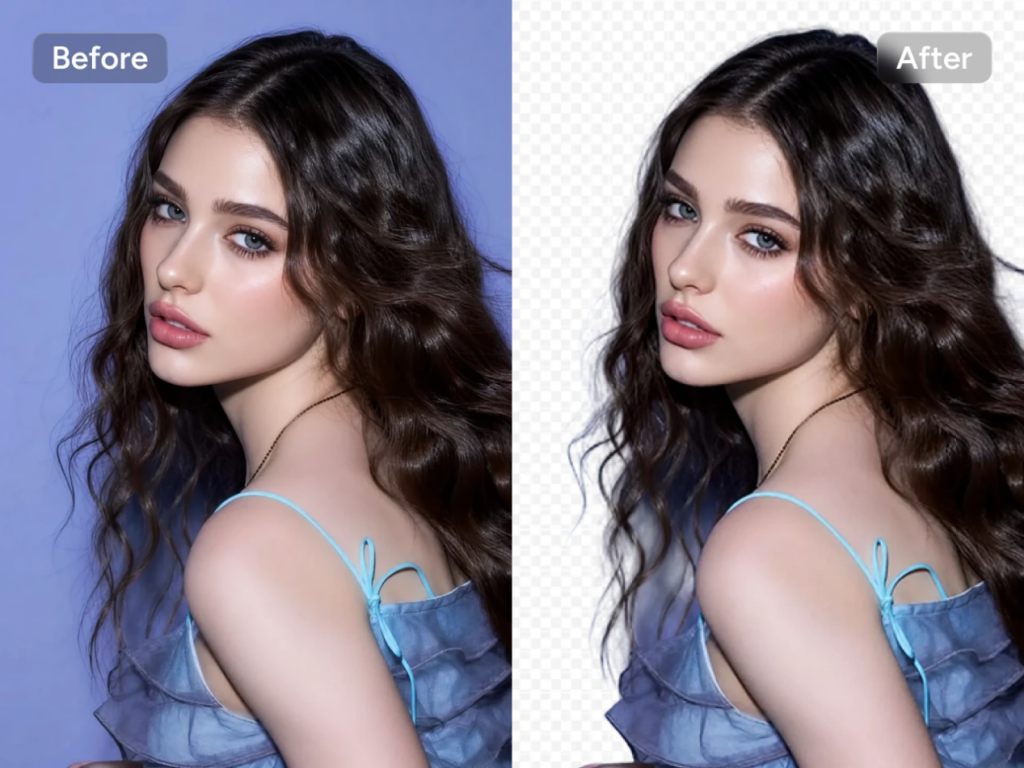
A good transparent background maker should also work well with different types of images, from e-commerce product photos and personal portraits to illustrations and creative designs. The goal is not just to remove a background, but to create a flexible image asset that can be reused for different purposes.
PicLumen Transparent Background Maker
Remove Backgrounds Without Complex Editing
Removing a background used to mean opening Photoshop, selecting the subject pixel by pixel, refining edges, and fixing details like hair, fur, or transparent packaging. For many images, this process could take significant time and require advanced editing skills.
PicLumen Transparent Background Maker simplifies this workflow.
Upload your image, and the tool automatically detects the main subject, separates it from the background, and creates a clean transparent picture. There is no need for manual layers, masks, or repeated adjustments. It is designed to handle different image types, including product photos, portraits, illustrations, and images with complex edges.

This becomes especially useful when managing multiple visuals at scale. For example, an e-commerce seller with dozens of products can prepare consistent product cutouts without manually editing every image one by one. With one-click removal, an entire catalog can be processed in minutes, and the results stay uniform across every image.
The result is a cleaner and more efficient workflow for creating professional visual assets.
Continue Creating After Background Removal
Background removal is only the first step. Once an image has been separated from its original background, PicLumen allows creators to continue developing it into new visual content.
Specific examples:
E-commerce listing backgrounds: A skincare bottle, once cut out, can be placed on a clean pastel gradient, a marble shelf, or a soft shadow background. Clothing items can be refreshed into new campaign visuals using existing product photos—perfectly matching Amazon, Shopify, or brand-site style guides without re-photographing.
Lifestyle scenes: Take a transparent image of running shoes and generate the pair on a forest trail, in a city street, or on a studio podium. One product photo becomes multiple lifestyle angles.
Social media campaigns: A transparent coffee mug can be composited onto seasonal backdrops — autumn leaves, festive holiday textures, summer beach tones — for posts and ads timed to each season.
Brand consistency: Place the same cutout across newsletters, banners, and packaging mockups so the product looks identical everywhere.
By combining background removal with further image creation, PicLumen helps users move from a simple transparent image to complete visual content for different platforms and campaigns.
Final Thoughts
Transparent backgrounds turn a single image into a flexible asset that adapts across e-commerce listings, marketing materials, and social media—no need to reshoot or redesign for every platform.
With PicLumen, creators can generate clean transparent images and swap backgrounds in seconds, making it easy to go from an Amazon product photo to a social media post using the same source image.