
You are not alone if your reading list continues to expand, yet your attention span continues to decline. Speechify is a text-to-speech application based on AI that aims to convert written material into audio that sounds natural. It can read academic papers, emails, PDFs, and even news articles, and Speechify will do it in a flash.
Here is an in-depth look at what Speechify is doing right, where it stumbles, and why it should or should not be a part of your productivity toolkit.
What Exactly Is Speechify?
Speechify is a voice generator AI that reads and pronounces the text. The platform is designed to be used by mobile users and casual listeners, and it can be accessed using mobile applications, web extensions, and web. In its Premium plan, users have over 200 AI voices, including celebrity-inspired ones, such as Snoop Dogg and Gwyneth Paltrow.
The site also allows multilingual output and customizable playback speed, with users being able to listen to the content at speeds up to 4.5x (and in certain plans, even 5x) speed. Simply put, Speechify is a tool that can help you read more quickly.
Who Gets the Most Value?
Speechify is not aiming to be all things to all people. It has a clear audience.
Best-Fit Users for Speechify
- Students and professional who have to consume vast quantities of written text in a short time frame I.e. medical textbooks and scholarly papers.
- People who have poor vision or eye strain and do not want to read on a screen but listen to text.
- Individuals with dyslexia, ADHD, or other learning disabilities, who can better assimilate information by audio.
- Someone who prefer to read when walking, commuting, or doing chores.
- The platform enables one to scan hardcopy documents, accelerate narration, and even convert images into readable audio. It is constructed in a way that is accessible and efficient.
When Speechify May Not Be the Right Choice
Speechify is not without its limitations.
- It can be too lightweight to satisfy the needs of the enterprise user with complex requirements, particularly because of the lack of advanced features and word count limitations.
- The voices on the free version can be a bit robotic to the budget users.
- The waitlist may frustrate developers who want to get instant access to the text-to-speech API.
Speechify is bright in the case of individuals, not necessarily big organizations.
Core Capabilities That Define the Experience
1. Advanced AI Text-to-Speech Processing
Speechify is fundamentally a text-to-audio converter. The Premium plan gives you over 200 voices in a variety of languages. It is compatible with Chrome, iOS, Android, Mac, and Windows, and is therefore ubiquitous. The experience is intuitive and easy. Nevertheless, there are instances of mispronunciation and omission of words. Nevertheless, as a general use, it works well.
2. Browser Integration with Chrome Extension
The Chrome extension of Speechify enables one to listen to Google Docs, PDFs, webpages, and others right in the browser. The latest changes have brought a small pill-shaped player that has made playback controls easy. It is easy to install, and even the non-technical users should not have a problem with it.
3. Multilingual Voice Library and Style Variety
Premium allows the user to access over 200 voices in more than 60 languages. The voices are formal, friendly, and celebrity-inspired. Nevertheless, the free-tier voices are significantly less sophisticated and may sound artificial. To creators and businesses, Speechify Studio goes far beyond that, with over 1,000 voices, 100+ languages and accents, and 13 emotional tones for voiceovers, dubs, podcasts, and social media content.
4. Smart OCR Technology for Printed & Handwritten Text
The OCR feature of Speechify makes it possible to take a picture of writing and turn it into audio. It can be used on screenshots, printed materials and even handwritten notes. It was tested that by taking a snapshot of an article, the app could read and transcribe the text in a short amount of time and then read it out loud in real time. The output can also be saved as an MP3 by the users. This aspect is especially effective in the processes of accessibility and document digitization.
How Much Does Speechify Cost?
Now to the question everyone asks before hitting “Subscribe.”
Speechify has a number of pricing options:
Free Plan
- Up to 10 voices
- Five language options
- Standard 1x speed
- No offline mode
- No file imports
- No advanced features
It is a good point of entry but restricted.
Premium Plan
- $11.58 per month (billed annually)
- $29 per month (billed monthly)
- 200+ high-quality voices
- Up to 5x listening speed
- Offline support
- File imports (PDFs, images, web pages)
This strategy is obviously targeted at serious users that use audio on a regular basis.
Audiobooks Plan
- $9.99 per user per month (annual billing)
- $14.99 per user per month (monthly billing)
- Access to 60,000+ audiobook titles
- Offline listening
Perfect for book lovers who desire more than text conversion.
Speechify Studio for Creators and Businesses
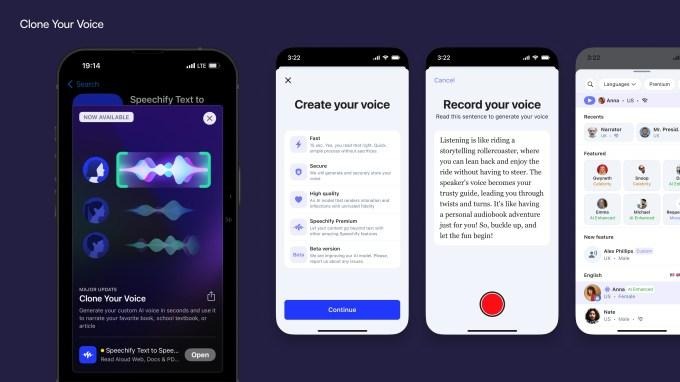
Speechify Studio is aimed at content creators and businesses, and provides more sophisticated features such as voice cloning, dubbing, and emotion control. It has 1,000+ voices and a wide range of languages. It’s a high-end upgrade.
User Experience and Interface Simplicity
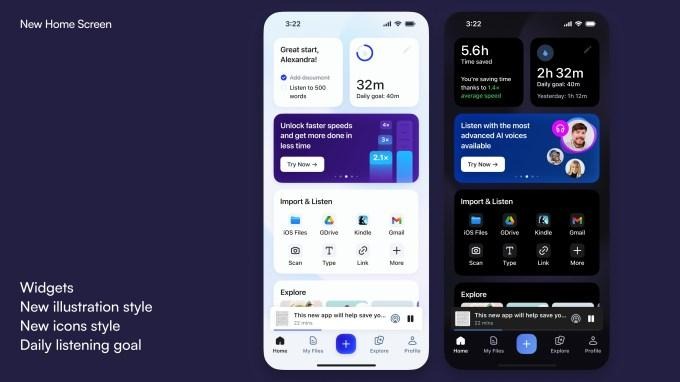
The interface of Speechify is minimalistic and function-oriented. The dashboard is simple, voices are properly structured, and the main task, which is to turn text into audio, is amazingly simple.
Alternatives to Consider
Although Speechify is powerful in the hands of individuals, there are other options that can be more appropriate to particular needs:
- Murf AI – Specializes in professional voiceovers with 200+ voices and 15 speaking styles.
- PlayHT – Provides 900 voices in 140 languages.
- ElevenLabs – ElevenLabs has a reputation for very realistic and natural sounding voice output, and it is affordable to start.
All competitors have their own advantages, especially in the enterprise scalability and the global voice diversity.
Is Speechify Worth It?
it depends on what you require.
If you are:
- A student drowning in books
- A professional who desires to do more than one thing at a time
- A person who has a problem with conventional reading
- Or simply a productivity enthusiast and enjoys listening at 3x speed
Yes, then Speechify is worth consideration. The Premium plan, specifically, takes the experience to a higher level. The distinction between free-tier robotic voices and high-end natural voices is evident. Real-world usability is also provided by offline support and file import features.
However, if you are a team of enterprise-level and require more sophisticated collaboration features, instant access to the API, or a high level of customization, Speechify can appear limiting. It is doing well in its area of expertise, that is, individual productivity.
Conclusion
Speechify does what it promises to do: it makes written material easier to listen to. It is free, easy to use, and loaded with voice features in its premium plans. Yes, there are some hiccups in pronunciation. Yes, the free plan is restrictive.
However, to students and professionals, as well as users who are concerned with accessibility, it is a viable and efficient solution. Assuming that productivity is saving time and minimizing friction, Speechify is a great argument to make, particularly when you get past the free version. The best way to decide? Try the free plan first.