
You need tools that keep technicians productive, customers satisfied, and operations visible — even when connectivity drops. A mobile field service app puts scheduling, job details, parts tracking, and offline work in one place so your team can finish jobs faster and with fewer return visits.
This article Mobile Field Service App shows which core features to look for and how those functions translate into measurable benefits for your business and technicians. Expect practical guidance on choosing and deploying an app that matches your workflows, reduces friction in the field, and improves first-visit resolution.
Core Features and Functionalities
These features let you manage jobs, work without connectivity, and match the right technician to each appointment. They drive faster response times, accurate reporting, and better first-time fix rates.
Real-Time Task Management
You see assigned work orders, task status, and service history in a single, prioritized view. The app displays job details such as customer contact, asset records, warranty status, required parts, and estimated duration so you can prepare before arrival.
Update task progress with checklist items, photo attachments, signature capture, and time tracking directly from the job screen. Managers receive instant status changes and can reassign or escalate tasks based on live updates.
Integrations surface related CRM notes and parts inventory. That reduces duplicate data entry and helps you confirm part availability or surface known issues before you arrive.
Offline Accessibility
You keep working when connectivity drops by caching relevant work orders, customer records, and asset details locally. The app queues your changes—time entries, checklist completions, photos, and signatures—and syncs them automatically when you regain a network.
Conflict resolution rules let you choose whether local changes or server updates take precedence in case of simultaneous edits. You control sync behavior to limit data use on metered connections and to prioritize critical records first.
Robust offline mode also supports location-tagged photos and scanned barcodes so you can document repairs accurately in remote areas. This preserves compliance evidence and ensures billing and parts consumption align with field activity.
Scheduling and Dispatch Tools
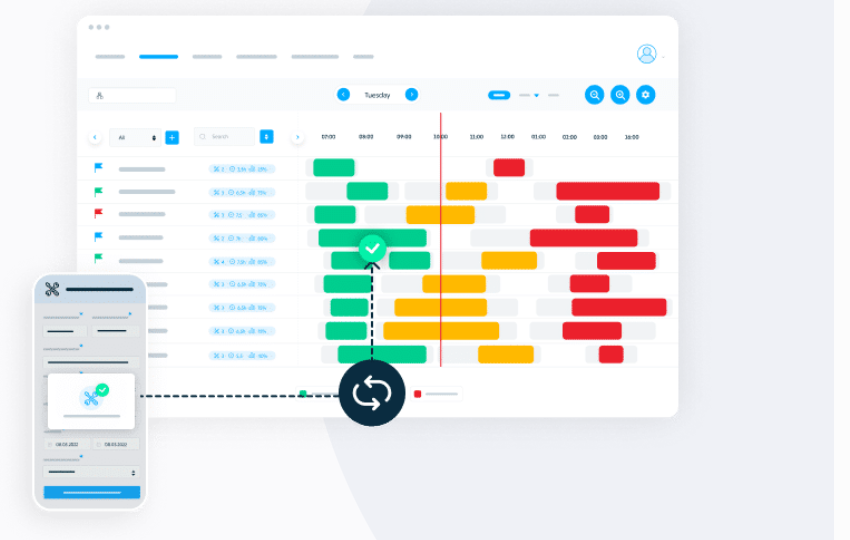
The scheduling interface shows technician calendars, travel times, and skill or certification matches to optimize assignments. You filter by geography, parts on hand, or SLA requirements to assign the best resource for each job.
Dynamic dispatch supports drag-and-drop rescheduling and automated re-routing when jobs run long or emergencies arise. The app calculates estimated arrival times and updates customers with SMS or in-app notifications to reduce no-shows.
Workforce analytics surface utilization, travel time, and missed appointment patterns so you can refine routing rules and reduce overtime. Integration with mapping and traffic services improves ETA accuracy and helps you plan realistic daily workloads.
Benefits for Businesses and Technicians
Mobile field service apps reduce manual work, speed up job completion, and improve information flow so you can dispatch faster, fix issues on the first visit, and keep customers informed.
Increased Productivity
A field app gives your technicians real-time access to job details, parts inventory, and service history on their device. You remove paper forms and cut data-entry time; technicians record parts used, capture photos, and sign off jobs on-site, which reduces return visits and shortens job cycles.
Dispatchers gain shift-level visibility into technician location, job status, and workload. You can insert emergency calls, reassign jobs instantly, and optimize routes to reduce travel time. That combination raises daily job counts per tech and lowers fuel and overtime costs.
Automation features — work order creation from customer requests, time tracking, and automatic invoicing — let your office close out jobs the same day. You free administrative staff to focus on exception handling rather than routine data entry.
Enhanced Customer Experience
You can provide accurate arrival windows and live technician ETAs, which decreases missed appointments and increases on-site first-time fixes. Technicians with access to full service histories and warranty data resolve issues faster and avoid unnecessary part purchases or redundant diagnostics.
Digital job confirmations, emailed invoices, and optional in-field payment processing speed customer billing and reduce disputes. You can push status notifications to customers at key milestones — dispatch, arrival, job completion — to keep them informed without extra calls.
When technicians capture photos and produce branded digital reports onsite, you build a stronger service record and clearer communication. That transparency increases trust and makes customers more likely to schedule follow-ups or recommend your service.
Streamlined Communication
A mobile app centralizes messages between dispatch, technicians, and customers so you avoid fragmented SMS threads or missed phone calls. Technicians receive job updates, parts requests, and safety alerts in-app; they can respond with notes, images, or short videos to clarify issues quickly.
Integration with back-office systems syncs inventory, billing, and CRM data in near real-time. You eliminate duplicate entries and reduce errors from manual transfers. Team collaboration features — task handoffs, escalation flags, and shared checklists — ensure complex jobs move smoothly between technicians and specialists.
Audit trails and timestamped updates give you accountable records for compliance and dispute resolution. You can track response times, measure communication bottlenecks, and target training where it will improve operational flow.