
I have run enough email migrations over the years to have developed a healthy suspicion of any tool that promises a “simple” enterprise move. At a few hundred mailboxes you can get away with a lot. At several thousand – with archive mailboxes, shared mailboxes, a forest of public folders, retention policies, and a business that cannot tolerate downtime – the cracks in a weak tool show up fast, usually on the worst possible weekend. So when I was asked to evaluate migration software for a large-scale Microsoft 365 project, I went in expecting to be disappointed.
The tool that kept rising to the top of my shortlist, and the one I ended up recommending, was EdbMails Office 365 Migration Software. This is my hands-on review of why. I will cover what it does, how it performed under enterprise conditions, the scenarios it handles, the security and pricing picture, and the few things I think you should know before you buy. I would still tell you to run the free trial against your own environment — every edbmailsestate has its quirks — but if you are responsible for a large migration, this is the tool I would put at the front of the queue.
Why Large Enterprises Need Specialized Migration Software
It is worth being clear about why this category exists at all. Microsoft’s native tools are built for the migrations Microsoft would like you to perform, and they assume a fairly clean, single-direction move. Real enterprises rarely have that. After years of growth and acquisitions, you end up with multiple tenants to consolidate, a Google Workspace domain inherited from a company you bought, legacy IMAP servers nobody wants to touch, and gigabytes of PST files scattered across the network. On top of that, Microsoft enforces throttling limits that cap how fast data can move, so simply running more migrations at once does not work — you get throttled into a crawl.
Doing all of this with native methods means living in PowerShell and stitching together several different approaches, each with its own failure modes. The whole point of dedicated software is to absorb that complexity. After testing EdbMails across the messy scenarios above, my honest take is that it absorbs more of it than anything else I tried in this price range.
What Is EdbMails?
EdbMails is a Windows-based migration application built around Microsoft 365 and Exchange workflows. From one interface it handles tenant-to-tenant migration, Microsoft 365 to Exchange in both directions, IMAP migration, Google Workspace Migration, PST export, and bulk PST import. If you want the full picture of how the product is structured before diving in, the vendor’s Office 365 migration overview and the page on understanding the application lay it out clearly, and I would suggest skimming both before your first run.
What gave me confidence as a reviewer is that the product is actively maintained. The release notes show steady updates – OAuth refinements, throttling adjustments, PST fixes. That is not a minor detail in this space. Microsoft changes Graph API behavior and throttling thresholds without much warning, and a migration tool that is not kept current can become unreliable within a year. EdbMails clearly keeps pace, which is exactly what you want underpinning an enterprise project.
Who This Review Is For
This will be most useful if you are an enterprise IT administrator or an MSP planning a large migration, a team consolidating tenants after a merger or acquisition, an organization moving mailboxes from Microsoft 365 back to on-premises or hosted Exchange, a business migrating to or from Google Workspace, Zimbra, or Zoho over IMAP, or anyone facing a bulk PST job that Microsoft’s native import service makes painful. If your project ticks any of those boxes at scale, read on.
System Requirements
One thing I appreciated immediately is how light the footprint is. You do not need to stand up a dedicated server — a standard IT workstation handled everything in my testing. The full, current list is on the supported platforms and system requirements page, but here is the short version.
| Requirement | Details |
| Operating system | Windows 11, 10, or 8.1; Windows Server 2012 or later |
| RAM | 512 MB minimum; 4 GB or more recommended for large migrations |
| Storage | About 20 MB for the app, plus space for .NET and Microsoft C++ libraries |
| Internet | Required for all cloud migration scenarios |
| Microsoft Outlook | Required only for PST export or import |
| Microsoft 365 | Any mailbox-enabled plan; Global Admin or Full Access rights |
The Migration Scenarios I Tested
EdbMails focuses on a handful of core scenarios, and the vendor documents each one thoroughly on its migration scenarios page. Here is how they held up in practice.
1. Office 365 Tenant-to-Tenant Migration
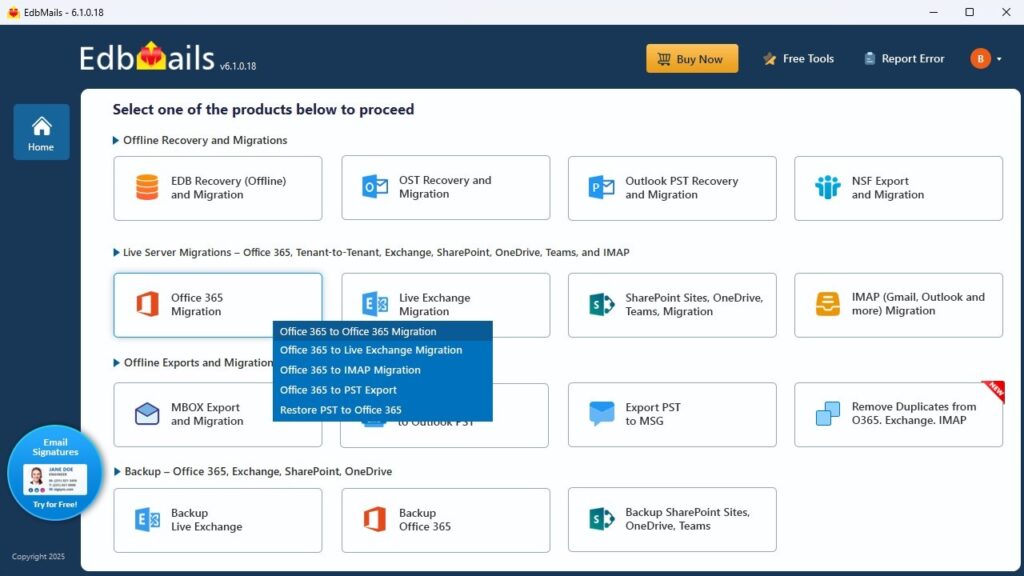
This is where EdbMails genuinely impressed me, and it is the scenario most relevant to large enterprises dealing with mergers and consolidations. It automatically discovered and mapped primary, archive, shared, and group mailboxes, and the Office 365 Tenant to Tenant workflow ran without me having to babysit it. The feature that earns its keep here is delta migration: each run moves only new or changed items, so I could pre-migrate the bulk of the data days ahead and then run a fast final sync at cutover. In my testing that took the effective downtime window from hours down to minutes, which at enterprise scale is the difference between a smooth Monday and a very bad one. Public folders came across with their full hierarchy and permissions intact, and CSV-based custom mapping handled the non-standard folder structures that automatic mapping cannot infer.
2. Office 365 to Exchange Migration
EdbMails moves mailboxes from Microsoft 365 back to on-premises Exchange 2013 through 2019, and to hosted Exchange. This is a less common direction, but it comes up constantly in regulated enterprises with data-sovereignty requirements and in post-acquisition consolidations where the parent runs Exchange. The Office 365 to Exchange flow mirrors the tenant-to-tenant process, and there is also a dedicated path for Office 365 to hosted Exchange. What I liked is that no manual PowerShell impersonation setup was required — the tool handles the permission scaffolding itself.
3. Office 365 to IMAP and Google Workspace
For moves to Google Workspace, Zimbra, Zoho Mail, or any standards-compliant IMAP server, EdbMails preserved message content, folder hierarchy, and metadata. There are clear guides for both general Office 365 to IMAP migration and specifically Office 365 to Gmail. This is the one scenario I would most strongly urge you to trial first, since IMAP behavior varies between targets, and remember that IMAP does not carry calendars or contacts — plan to handle those separately.
4. Office 365 to PST Export
Exporting mailboxes to PST is essential for legal hold, compliance archiving, and offboarding — all routine in large organizations. Following the Office 365 to PST guide, I could select individual mailboxes, groups, or the whole tenant, with filters for date range, folder, sender, and subject. Two practical notes: Outlook must be installed on the migration machine for any PST operation (a Microsoft constraint, not an EdbMails one), and very large mailboxes are best split across multiple PST files rather than left to balloon past 20 to 30 GB.
5. Bulk PST to Office 365 Migration
If your enterprise is sitting on years of PST archives — and most are — the multiple PST to Office 365 capability is genuinely useful. It includes PST-to-mailbox mapping, duplicate detection, and incremental runs. Microsoft’s native PST import service is free but widely disliked for its complexity; EdbMails was simply faster to operate, and at enterprise volumes the saved hours matter.
Granular scenarios that matter at scale
Beyond the headline scenarios, EdbMails covers an unusually long list of specific moves that large estates actually need, with dedicated guides for each — for example public folder to Office 365, archive mailbox to Office 365, shared mailbox to Exchange, and public folders to PST. That breadth is part of what makes it a true single-tool solution rather than something you outgrow halfway through a project.
The Features That Actually Matter at Enterprise Scale
Plenty of tools list features. These are the ones that, in my experience, decide whether a large migration succeeds quietly or turns into an incident — and EdbMails delivers on all of them.
- Parallel migration . A single machine migrates up to 20 mailboxes at once, and because the licence allows installation on multiple machines, you can scale that across a team. The real ceiling is Microsoft’s throttling, but this concurrency meaningfully shortened my large test runs.
- True delta migration. It compares message identifiers between source and target before transferring, so re-running a job never creates duplicates. For any staged enterprise cutover, this is the single most important capability, and it worked flawlessly for me.
- Automatic throttling management. It monitors Microsoft’s throttling responses in real time and backs off automatically. On very large tenants — think 5,000-plus mailboxes — you may want to dial back the default concurrency to avoid sustained throttling, but the automation handled the rest.
- Granular filtering and folder mapping. Filtering by date, folder, sender, recipient, and subject, plus surgical control over destination folders and CSV mapping, gave me far more precision than native methods. This is one of the most flexible filtering implementations I have seen at this price.
- Automatic mailbox creation and mapping. EdbMails can auto-create target mailboxes and assign licences. In an enterprise you will usually pre-provision for cost predictability, but it is a nice option for smaller batches.
- Sandbox / test mode. You can validate authentication, mappings, and connectivity against a small subset before the full run. I cannot overstate how much trouble this saves — projects that skip test runs find their problems during cutover instead.
- Reconnection on interruption. A network drop during a long run resumes from the last checkpoint instead of restarting. Over a multi-day enterprise migration, that resilience is essential.
What EdbMails Migrates
Within the Office 365 migration licence, EdbMails covers primary mailboxes (full folder hierarchy, metadata, attachments, and properties), in-place archive mailboxes, shared mailboxes with their permissions, Microsoft 365 group mailboxes in tenant-to-tenant moves, public folders with nested structures, and PST files for bulk import and export with duplicate detection. SharePoint Online, OneDrive for Business, and Microsoft Teams migration sit under a separate licence, which I actually like — you buy only what you need rather than paying for a bloated all-in-one.
Walkthrough: What Running a Migration Actually Felt Like
The workflow is refreshingly straightforward, and the software setup guide gets you going quickly. Here is the flow as I experienced it.
- Install. The installer is lightweight and pulls in supporting components automatically. The free trial needed no payment details, which made evaluation painless.
- Select the migration type. A clean dropdown lets you pick source and target across every supported scenario.
- Authenticate the source. OAuth 2.0 redirected me to Microsoft’s sign-in page, with MFA fully supported. Manual credentials are available where OAuth is not suitable.
- Load mailboxes. Mailboxes loaded automatically from the tenant, with per-folder item counts shown so I could see exactly what was coming across.
- Authenticate the target. The same process loaded the destination mailboxes for mapping.
- Map, filter, and configure. Automatic mapping handled most of it; filters and CSV mapping covered the edge cases, and I set concurrency here.
- Run the migration. A live progress window tracked item counts, speed, and any issues, with alerts surfacing problems immediately and automatic reconnection working silently in the background.
- Review and sign off. A detailed log documented everything migrated, skipped, or errored — exactly the audit trail you need for enterprise sign-off and compliance reporting.
Security and Compliance
For a large enterprise, this section can make or break a tool, and EdbMails held up well. Its security posture is genuinely enterprise-grade:
- OAuth 2.0 with MFA. Authentication goes directly to Microsoft’s identity platform, and credentials are never stored within EdbMails.
- TLS encryption in transit. Data moving between source and target travels over encrypted TLS connections.
- AES 256-bit encryption. Migration metadata stored locally is protected with strong encryption.
- ISO 27001 / 27018 certified. The vendor cites certifications covering information-security management and cloud privacy.
- GDPR aligned and HIPAA-appropriate. Suitable for regulated organizations with the right Microsoft 365 licensing.
- Direct transfer. Data moves straight from source to destination, so no copy of your email sits on a third-party server.
Pricing
EdbMails uses a per-mailbox, one-time lifetime licence — you pay once for the mailboxes you need, with no recurring fees or per-migration charges. For an enterprise that does not migrate continuously, that is dramatically cheaper than subscription-based rivals.
| Office 365 mailboxes | Total cost |
| 10 mailboxes | $80 |
| 100 mailboxes | $299 |
Bundle offer — Exchange + Office 365 migration:
| Mailbox count | Total cost |
| 10 Exchange + 10 Office 365 | $144 |
| 100 Exchange + 100 Office 365 | $538 |
At roughly $0.50 to $1 per mailbox depending on volume, this is among the most competitive pricing I have come across. The licence installs on multiple machines (enabling parallel runs across a team), includes lifetime upgrades, and comes with a 30-day money-back guarantee. For MSPs running migrations across many clients, the model scales cleanly without forcing a platform change as you grow. Weighed against the cost and risk of a botched enterprise migration, the EdbMails Office 365 migration tool is, frankly, inexpensive insurance.
Customer Support
Support is 24/7 via live chat and email, which matters when an enterprise cutover is running overnight or on a weekend. In my interactions, responses were prompt and knowledgeable. Public reviews on Capterra, G2, and Trustpilot lean positive on support, and the self-service documentation — user manual, scenario guides, video walkthroughs, and a blog tracking Microsoft 365 changes — is more thorough than most vendors bother to provide.
EdbMails vs. Native Microsoft Methods
| Capability | EdbMails | Native M365 / PowerShell |
| No scripting required | Full GUI | PowerShell required |
| True incremental delta migration | Message-level | Manual setup |
| Parallel migration (up to 20) | Built-in | Not available |
| Automatic throttle management | Real-time | Manual |
| Auto mailbox mapping and creation | Yes | Manual |
| Granular filtering | Full | Limited |
| Public folder migration with permissions | Full support | Complex, manual |
| PST export and import | Built-in | Requires Outlook tools |
| Free trial | Available | No |
| 24/7 expert support | Yes | No |
| Licence model | One-time, lifetime | Subscription |
A Few Things to Keep in Mind
To keep this honest — and because no tool is perfect — there are a few points worth knowing. EdbMails runs on Windows only, so a Mac-primary shop will need a Windows VM or a dedicated machine. Outlook must be installed for any PST export or import, though that is a Microsoft requirement rather than an EdbMails shortcoming. On very large tenants you may need to tune concurrency manually to avoid sustained throttling. And IMAP moves do not carry calendars or contacts, which you will need to migrate separately. None of these were deal-breakers for me; they are simply the realities to plan around.
Frequently Asked Questions
What is the best Office 365 migration software for large enterprises?
For large-scale projects, EdbMails is one of the strongest options. It handles tenant-to-tenant, Exchange, IMAP, and PST migrations from a single interface, with parallel migration, message-level delta migration, and automatic throttling management that are specifically valuable at enterprise scale.
Does EdbMails reduce downtime during a large migration?
Yes, significantly. Its delta migration lets you pre-migrate the bulk of the data ahead of cutover and then sync only new items at the end, which in my testing reduced the effective downtime window from hours to minutes.
Can EdbMails handle thousands of mailboxes?
Yes. It migrates up to 20 mailboxes in parallel per machine and installs on multiple machines, and it manages Microsoft’s throttling automatically. On very large tenants you may need to tune concurrency, but it is built for scale.
Is EdbMails secure enough for regulated enterprises?
It authenticates through Microsoft’s identity platform with OAuth 2.0 and MFA, encrypts data in transit with TLS, transfers directly with no third-party storage, and cites ISO 27001/27018 certifications along with GDPR-aligned processing, making it suitable for many regulated environments.
Do I need PowerShell to run an enterprise migration with EdbMails?
No. The entire process runs through a graphical interface, and the tool handles the permission scaffolding itself, so there is no PowerShell impersonation setup to configure.
How is EdbMails priced for enterprises?
It uses a one-time, per-mailbox lifetime licence with no recurring fees, lifetime upgrades, and a 30-day money-back guarantee. At roughly $0.50 to $1 per mailbox depending on volume, it is highly cost-effective for large migrations.
My Verdict
After putting EdbMails through the kinds of scenarios that break lesser tools, I am comfortable calling it one of the top-rated Office 365 migration solutions for large enterprises in 2026. It delivers where it counts: tenant-to-tenant consolidation, Microsoft 365 to Exchange, IMAP and Google Workspace moves, PST export, and bulk PST import, all from one interface, with the automation depth — parallel migration, message-level deduplication, real-time throttle management, sandbox testing, and automatic reconnection — that determines whether a large migration goes smoothly. The security posture is solid, the support is there when you need it, and the lifetime licence keeps costs predictable. If you are planning an enterprise migration and want software that handles complexity without demanding a specialist to configure it, I would put EdbMails Office 365 Migration Software at the top of your list. Just do what I did and run the trial against your own environment first.