What a DMARC Check Is and Why It Matters for Domain Protection
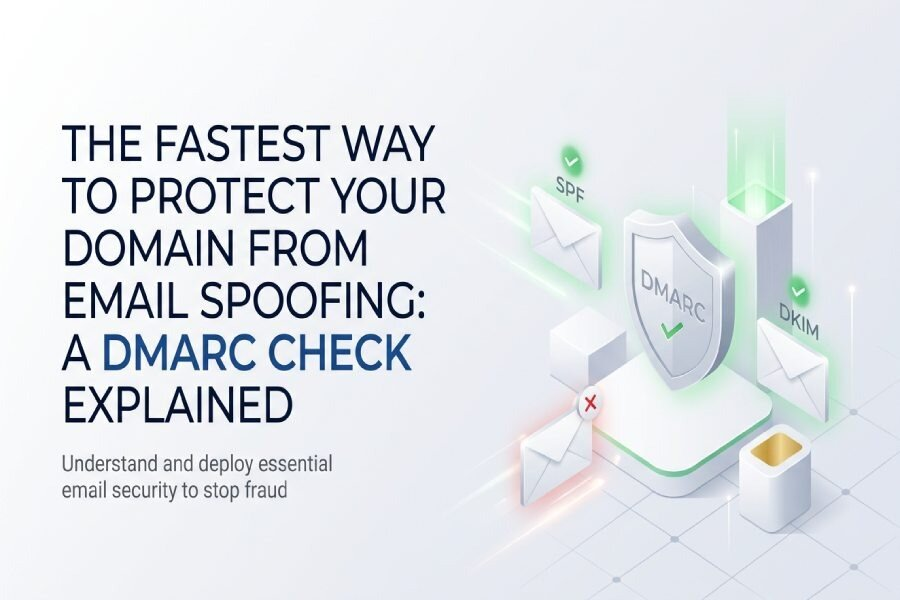
Performing a DMARC check is an essential, proactive diagnostic task that ensures your domain is set up correctly to guard against email spoofing and unauthorized access. DMARC, short for Domain-based Message Authentication, Reporting, and Conformance, enhances email security by utilizing existing frameworks like SPF (Sender Policy Framework) and DKIM (DomainKeys Identified Mail).
When a DMARC record is accurately published as a DNS record — specifically a `_dmarc TXT record` — it provides explicit guidelines for email providers (such as Google, Yahoo, and Microsoft Exchange) on how to handle messages that do not meet SPF or DKIM criteria. A thorough DMARC validation process confirms that your policy is correctly formatted and that your domain is safeguarded in accordance with RFC 7489.
Regularly conducting a DMARC check is vital for robust domain authentication and overall email safety. If DMARC validation fails, organizations may face risks like email spoofing, phishing attacks, and business email compromise, which can undermine customer confidence and harm brand reputation.
How DMARC Works with SPF and DKIM to Stop Email Spoofing
The Role of SPF and DKIM in Email Authentication
SPF and DKIM are essential elements of email authentication that serve as the groundwork for DMARC:
- SPF enables domain administrators to designate specific mail servers permitted to send emails for their domain. This is accomplished through DNS records, and a successful SPF check indicates that the sending server corresponds with the information in the domain’s SPF record.
- DKIM, on the other hand, facilitates the signing of emails with a cryptographic signature, which guarantees the message’s integrity and authenticity. Proper alignment of DKIM domains and signatures is vital for verifying that the email genuinely originates from the claimed sender and remains unmodified.
DMARC’s Alignment Mode: Closing Loopholes
DMARC connects these systems by enforcing alignment. To successfully pass a DMARC verification, the domain listed in the “Header From” (referred to as POLICY_DOMAIN in RFC 7489) must match the domains that SPF and DKIM authenticate — known as SPF alignment and DKIM signature alignment. This stringent “alignment mode” blocks attackers who might use one method (such as SPF) with a domain that differs from the displayed “From” address, a frequent strategy in email spoofing.
Policy Distribution and Enforcement
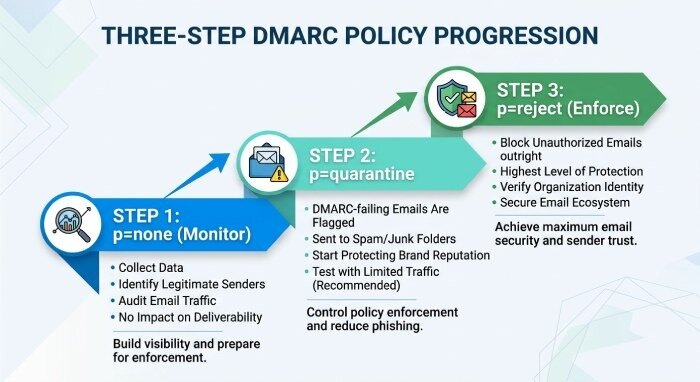
With DMARC, domain owners establish a specific policy through the policy tag (for example, `p=none`, `p=quarantine`, or `p=reject`):
- `p=none`: Tells recipients to take no action while still generating DMARC reports.
- `p=quarantine`: Recommends that questionable emails be directed to the spam or junk folders.
- `p=reject`: Requires that any non-compliant messages be completely rejected.
The enforcement of these policies by email providers, including adherence to Yahoo’s and Google’s sender requirements, determines if DMARC operates in “monitoring,” “quarantine,” or “strict enforcement” modes.
How to Run a DMARC Check: Key DNS Records, Tags, and Results to Review
Steps to Performing a DMARC Check
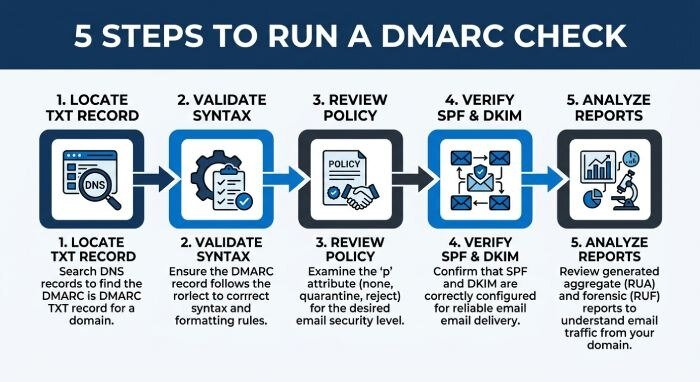
Conducting a successful DMARC check requires a series of analytical and validation steps.
1. Locate the dmarc TXT Record
- Utilize a DMARC lookup or a DMARC record verification tool — like EasyDMARC Record Checker, dmarcian DMARC Inspector, or MXToolbox — to locate and review your published DMARC TXT record in the DNS.
2. Validate Record Syntax and Tags
- A DMARC record consists of various tags, such as the policy tag, rua tag for aggregate reports, ruf tag for forensic reports, alignment modes (sp and adkim), and the percentage tag. Validation tools examine the syntax of the record to ensure that the values are authorized and identify any syntax errors or unsupported DMARC tags.
3. Review DMARC Policy Configuration
- Evaluation of the DMARC status to determine if it is in monitoring mode (p=none), has partial enforcement (p=quarantine), or is fully enforced (p=reject).
- Confirmation of subdomain policy through the `sp` tag, allowing specific enforcement for subdomains separate from the main organizational domain or PARENT_POLICY.
4. SPF and DKIM Verification
- The DMARC diagnostic tool performs checks on SPF and DKIM to confirm server permissions and cryptographic signatures. These assessments analyze SPF and DKIM alignment to guarantee that emails sent from the domain are correctly authenticated and adhere to DMARC requirements.
5. Analyze Reporting Addresses and Format
- The rua tag indicates the destination for DMARC aggregate reports, which are delivered in XML format, while the ruf tag identifies where forensic reports, usually formatted as afrf or iodef, go. Verify the accuracy of the email addresses and reporting frequency, and check that the report format aligns with your analytics tools or email security system.
Key Results and Their Implications
An effective DMARC evaluation provides feedback regarding each element’s status:
- Valid DMARC record: Indicates that the settings are correct and values are properly authorized.
- Diagnostic check unsuccessful: Suggests there may be a misconfiguration or that the policy is being shared improperly.
- Absence or invalidity of reporting addresses: Leads to a lack of insight into email activities, which weakens defenses against phishing attacks.
- Record syntax errors: If the record contains mistakes (like incorrect semicolons or unauthorized values), mail servers will disregard it, negating DMARC’s purpose.
Common DMARC Check Errors and How to Fix Them Quickly
Typical DMARC Validation Errors
Misconfigurations and Syntax Errors
- Record Syntax: Frequent syntax mistakes involve omitted necessary tags (like the policy tag), unescaped special characters, or invalid tag values.
- Absence of _dmarc TXT Record: Not having this record results in a lack of DMARC protection.
- Incorrect rua/ruf Tags: Using incorrect or unverified email addresses can hinder the receipt of aggregate and forensic reports.
Alignment and Authentication Failures
- SPF alignment issue: The domain in the ‘From’ field does not match the domain specified in the SPF record.
- DKIM signature alignment issue: There is a discrepancy between the DKIM domain and the domain in the Header From field.
- Policy tag issues: The values for `p` are incorrect (must be either p=none, p=quarantine, or p=reject).
Quick Fixes for Fast Remediation
Record Correction and Redeployment
- Utilize a DMARC record verification tool to pinpoint specific issues and suggest fixes before reapplying it to your domain setup. Once adjustments are made, revise and reestablish the corrected _dmarc TXT record with the suggested tags and approved values.
Authentication Alignment Adjustments
- Adjust the SPF and DKIM configurations on your mail servers (like Microsoft Exchange, Google, or those provided by ISPs) to match your domain as specified in the DMARC record. Make sure that all authorized email applications and external senders are correctly listed in your SPF record.
Reporting and Diagnostic Checks
- Verify the addresses listed in the rua and ruf tags to make sure they are operational and being actively monitored. Ensure the reporting format is correct — XML is typically used for aggregate reports, while afrf/iodef is used for forensic reports — to facilitate prompt analysis and fraud prevention.
Best Practices After a DMARC Check: Monitoring, Reporting, and Moving to Enforcement
Ongoing Monitoring and Analysis
Once you’ve completed an initial DMARC check and verified that your record is configured correctly, it’s important to continuously monitor your domain’s email activity through DMARCreport. A DMARC report sent to the email addresses specified in the rua tag provides valuable insights into all servers sending emails on behalf of your domain, helping you detect unauthorized senders, authentication failures, and configuration issues. You can also enable forensic reports using the ruf tag to receive detailed information about individual email authentication failures, making it easier to investigate potential phishing, spoofing, or other malicious email activity.
Gradual Policy Progression
Start with p=none
Shifting the DMARC policy from `p=none` (monitor mode) to a more rigorous approach should be done gradually. Start by reviewing aggregate reports to evaluate legitimate traffic and pinpoint any unauthorized sources.
Move to p=quarantine and p=reject
After confirming all authorized sending sources and settling alignment concerns, step up the enforcement level to `p=quarantine`, and ultimately aim for `p=reject` to maximize protection against phishing and fraud. Continuously keep an eye on the reporting timeline and make sure that reporting addresses are current during this process.
Regular Diagnostic Checks and Misconfiguration Detection
Conduct routine DMARC lookups, diagnostic assessments, and verifications of your _dmarc TXT record with trusted DMARC diagnostic tools such as EasyDMARC, dmarcian, and MXToolbox. This practice promotes ongoing email deliverability, strengthens email security, and effectively identifies any new misconfigurations that could occur due to shifts in domain infrastructure or policy updates.
By adhering to this cycle of DMARC verification, application, and ongoing review, organizations significantly lower their risk of email spoofing, enhance domain authentication, and establish dependable, standards-compliant protection for both their brand and recipients.