
AI image generation has become part of everyday creative work. Designers use it to explore concepts, marketers prepare campaign graphics, bloggers create featured images, and small businesses build content for social media. Most people start with online AI tools because they are easy to access from a browser. You open a website, type a prompt, and wait for the image to appear.
That approach works well, but it is no longer the only option.
Desktop AI applications are becoming more capable as computers continue to improve. Instead of depending on browser tabs for every task, creators can now generate images, improve them, and prepare finished assets from one application running on their own computer.
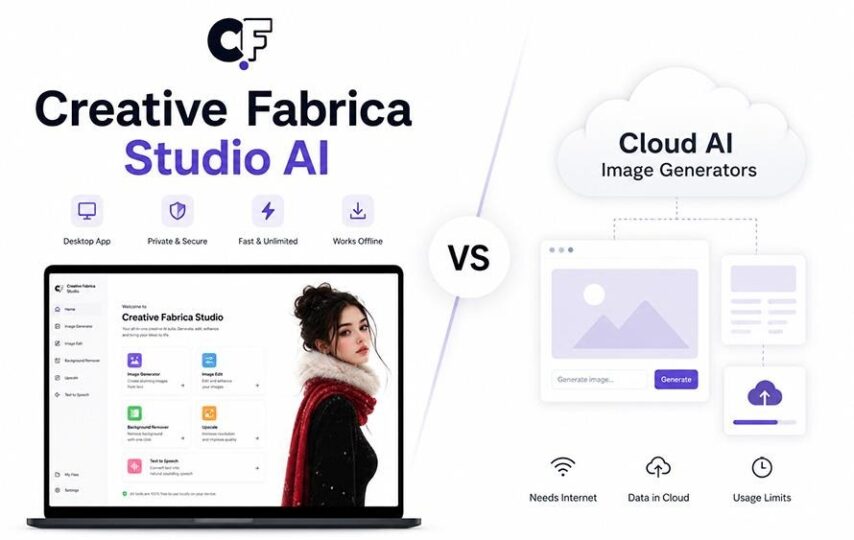
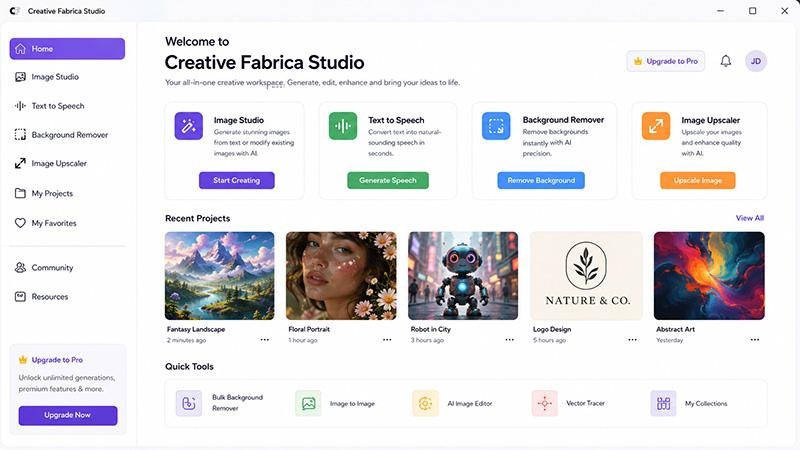
The latest version of the Creative Fabrica Studio AI is a good example of this shift. It combines local AI image generation, High Quality Rendering, more than fifteen built-in LoRAs, background removal, image upscaling, and text-to-speech in a single workspace. Rather than replacing creativity, these tools help creators spend less time moving between different services and more time developing their ideas.
So which approach is better? The answer depends on the type of work you do. Understanding the strengths of desktop AI and cloud AI can help you choose the workflow that fits your projects.
Why AI Image Generation Has Changed the Creative Process
Only a few years ago, creating original artwork often required advanced illustration skills or many hours inside professional editing software. Today, AI can turn a written description into an image within minutes. This has opened new opportunities for designers, educators, content creators, online sellers, and businesses that need original visuals on a regular basis.
The biggest advantage is speed during the idea stage. Imagine you are planning a new website for a travel company. Before choosing a final design, you may want to test several concepts. One version could feature a tropical beach, another a mountain landscape, and another a busy European street. AI lets you compare these directions quickly before investing time in detailed editing.
The quality of those first results also continues to improve. Modern AI models can produce realistic lighting, detailed textures, and balanced compositions that serve as a strong starting point for creative projects. Instead of beginning with a blank canvas, you begin with visual ideas that can be refined and expanded.
For many creators, AI has become another creative tool rather than a replacement for traditional design skills. It helps generate possibilities, while the final decisions still come from the person behind the project.
Desktop AI and Cloud AI Follow Different Workflows
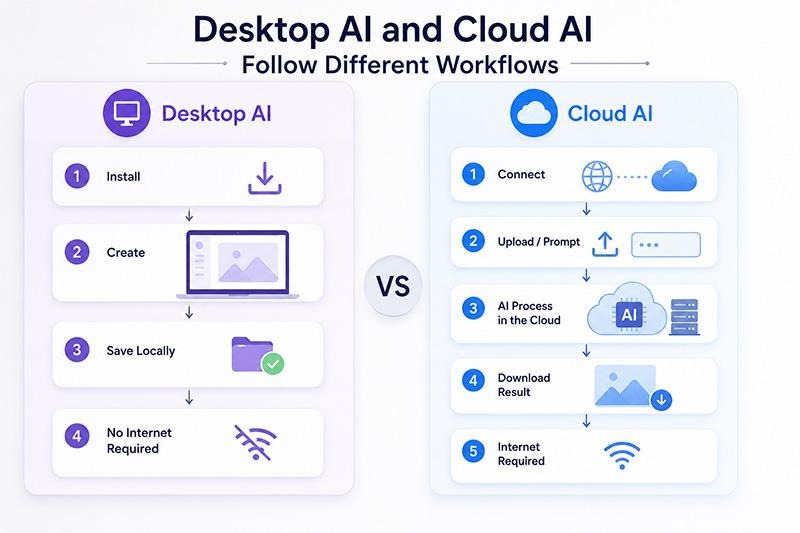
Cloud AI has become familiar because it is simple to access. You open a browser, upload your files if needed, enter a prompt, and receive your results online. For occasional users, this process is convenient and requires very little setup.
Desktop AI follows a different path.
Instead of relying on a browser throughout the creative process, the application runs directly on your computer. That changes the way many projects are completed. You can move from image generation to background removal, image upscaling, and text-to-speech without opening several separate services.
Imagine a blogger preparing a complete article. They need a featured image, two supporting illustrations, and a short narrated video for social media. With several browser-based tools, that project might involve moving files between different websites before everything is finished.
Using a desktop application, much of that workflow stays together. Images are generated, edited, improved, and exported from one workspace. This keeps the project organized and reduces the number of steps needed to complete everyday creative tasks.
Another advantage is continuity. When you are working on several projects during the same day, having one application open instead of multiple browser tabs helps maintain focus and makes it easier to keep related files together.
Why High Quality Rendering Deserves More Attention
Many people focus on how quickly AI creates an image, but image quality becomes much more important once the artwork is ready to be published. A concept that looks acceptable during testing may not be detailed enough for a presentation, marketing campaign, printed poster, or website banner.
This is where High Quality Rendering becomes valuable.
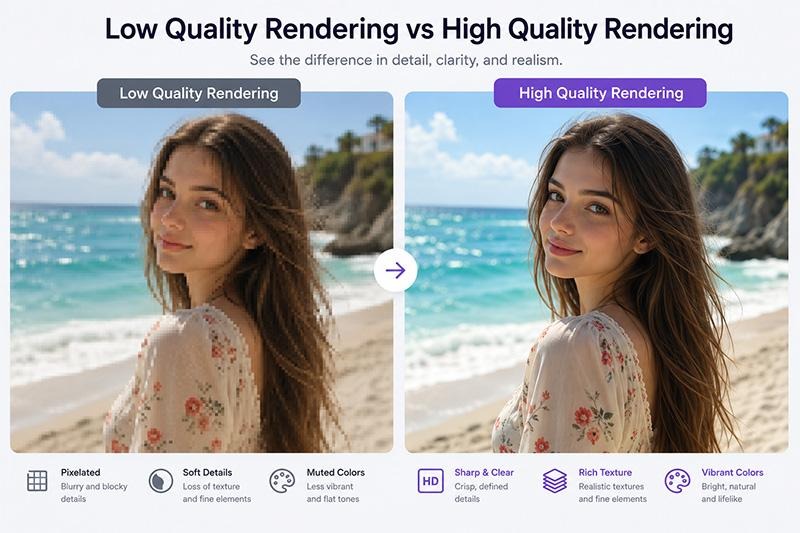
Creative Fabrica Desktop provides both Low Quality Rendering and High Quality Rendering because each serves a different purpose. Low Quality mode is designed for exploration. You can test prompts, compare compositions, adjust lighting, or experiment with different ideas before choosing your favorite version.
Once the concept is approved, High Quality Rendering creates a cleaner result with sharper details, improved textures, and more balanced lighting. Small objects become easier to recognize, edges appear smoother, and the overall image looks more suitable for professional use.
For example, imagine you are creating a hero image for an online furniture store. During the planning stage, you generate five room concepts using Low Quality Rendering to compare layouts and colors. After selecting the strongest concept, you recreate it with High Quality Rendering. The final image is detailed enough to appear on the website homepage, in digital advertisements, and even in printed marketing material.
This two-step workflow saves time because you explore ideas quickly while reserving the highest quality output for the images that will actually be published.
Low Quality Rendering vs High Quality Rendering
| Feature | Low Quality Rendering | High Quality Rendering |
|---|---|---|
| Best For | Testing prompts and layouts | Final artwork and publishing |
| Rendering Speed | Faster | Slightly longer |
| Image Detail | Basic | Sharper textures and finer details |
| Lighting | Standard | More realistic and balanced |
| Best Use | Brainstorming and concept creation | Websites, presentations, print, marketing campaigns, and social media |
Why Built-in LoRAs Can Completely Change Your Results
Image quality is only one part of creating strong AI artwork. Style is equally important.
A business creating product advertisements needs a different look from a fantasy author designing a book cover. A travel blogger wants different visuals than someone creating children’s learning materials. Asking the AI to produce every style with prompts alone often leads to inconsistent results.
Built-in LoRAs solve much of that problem.
A LoRA is a small AI model trained to teach the main image model a particular style, subject, or artistic approach. Instead of changing the entire AI system, it adds new creative abilities that can be selected whenever they are needed.
Creative Fabrica Desktop includes more than fifteen built-in LoRAs, allowing creators to start experimenting immediately. You can use the same prompt while applying different LoRAs to produce completely different visual outcomes.
For instance, imagine the prompt describes a small cabin beside a lake at sunset.
One LoRA may create a realistic landscape suitable for a travel brochure.
Another may produce a watercolor illustration for a greeting card.
A third may generate a comic-inspired version that could be used in a graphic novel.
A fourth may create a fantasy interpretation with magical lighting and dramatic scenery.
Instead of rewriting long prompts each time, you simply change the selected LoRA and compare the results. This makes it much easier to maintain a consistent visual style across an entire project, whether you are creating website graphics, printable artwork, YouTube thumbnails, or social media campaigns.
Complete Your Creative Workflow Without Switching Between Multiple Tools
Generating an AI image is usually just the first step. After that, most creators still need to prepare the image for its final purpose. A background may need to be removed, the resolution might need to be increased for printing, or the artwork may become part of a presentation or video.
Creative Fabrica Desktop brings these tasks together in one workspace.
Imagine you are creating marketing material for a new coffee shop. You start by generating a cozy café scene using High Quality Rendering. The owner likes the atmosphere but wants only the coffee cup to appear on the promotional poster. Instead of creating another image, you use the background removal tool to isolate the cup and place it on a clean branded background.
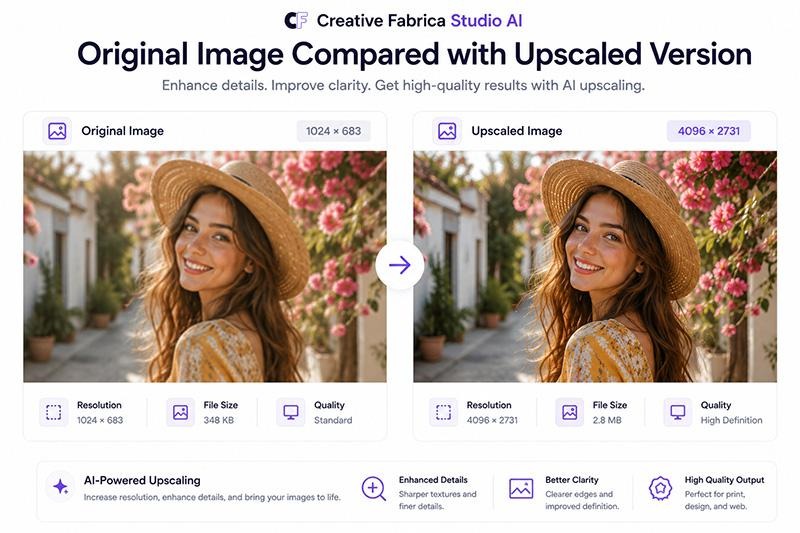
Next, the same artwork needs to appear on a large window banner outside the shop. Rather than stretching the original image and losing detail, you use the built-in image upscaler to produce a larger version with improved clarity.
Finally, you prepare a short promotional video for social media. Using the text-to-speech feature, you convert a short marketing message into narration that introduces the new café.
Instead of moving files through four or five different services, the project stays inside one application from the first prompt to the finished marketing assets.
Background Removal and Image Upscaling Solve Everyday Problems
Some AI features are impressive because they create something completely new. Others become valuable because they solve everyday problems that creators face again and again.
Background removal is one of those tools.
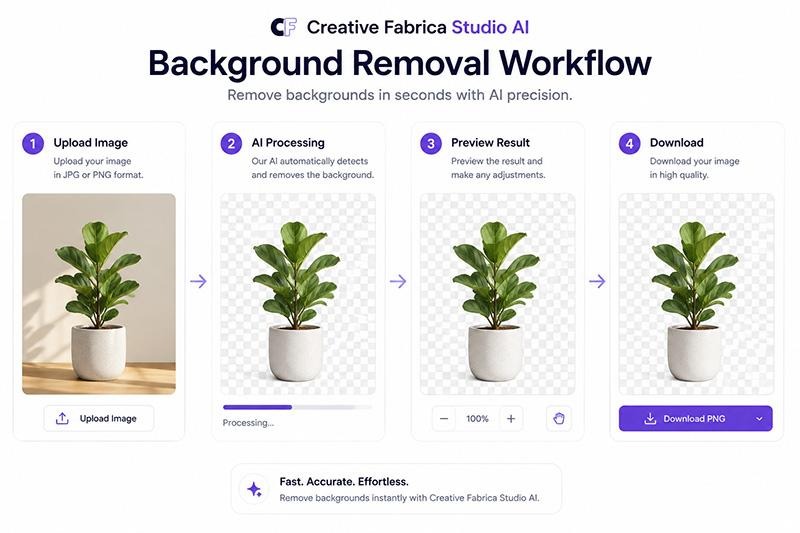
Suppose you are designing an online store. The product images you receive from a supplier all have different backgrounds. Some are white, some are gray, and others were photographed inside a warehouse. Removing those backgrounds allows you to create a consistent product catalog without manually editing every image.
The same tool is useful when designing presentations, social media graphics, printable stickers, or promotional flyers. A transparent image is much easier to reuse across different layouts.
Image upscaling is equally practical.
Perhaps you created a featured image for your blog two years ago. At the time it looked fine, but now your website uses larger banners and higher-resolution displays. Rather than redesigning the graphic from the beginning, you can upscale the original image to produce a cleaner version that works better on modern screens.
Design agencies, bloggers, teachers, marketers, and online sellers all collect libraries of older graphics. Being able to improve those existing files can save hours of work while extending the life of valuable content.
Which Creators Benefit the Most from Desktop AI?
Desktop AI is useful for far more than graphic design.
A blogger can create featured images and supporting illustrations without relying on stock photography for every article.
A small business owner can prepare seasonal advertisements, product graphics, and social media posts from one application.
An online seller can generate promotional artwork, remove backgrounds from product photos, and upscale images before uploading them to an online marketplace.
Teachers can create classroom graphics, worksheets, and presentation visuals. Marketing teams can produce campaign concepts before sending them for approval. Freelancers can experiment with different LoRAs to match the visual style of each client instead of repeating the same look across every project.
The biggest advantage is flexibility. Whether you create one image a week or several every day, having AI image generation, High Quality Rendering, built-in LoRAs, background removal, image upscaling, and text-to-speech in one desktop application helps simplify the creative process while giving you more room to experiment.
Frequently Asked Questions
1. What is the difference between Low Quality Rendering and High Quality Rendering?
Low Quality Rendering is designed for testing ideas quickly. High Quality Rendering produces cleaner details, sharper textures, and stronger lighting for images that are ready to publish or print.
2. What is a LoRA in AI image generation?
A LoRA is a small AI model that teaches the main image model a specific style or concept. It allows you to create artwork in different visual styles without changing the core model.
3. Why are built-in LoRAs useful?
Since Creative Fabrica Desktop includes more than fifteen built-in LoRAs, you can start experimenting immediately instead of searching for additional models before creating your artwork.
4. Can I use different LoRAs with the same prompt?
Yes. Using the same prompt with different LoRAs is a simple way to compare artistic styles and find the one that best matches your project.
5. Is image upscaling only useful for photographers?
No. Bloggers, marketers, online sellers, designers, educators, and content creators can all use image upscaling to improve older graphics or prepare larger images for presentations and print.
6. When should I use background removal?
Background removal is useful for product photos, logos, portraits, marketing graphics, presentations, online stores, and any project that requires transparent PNG images.
7. Who is Creative Fabrica Desktop best suited for?
It works well for designers, bloggers, educators, freelancers, marketing teams, online sellers, content creators, and anyone who regularly produces visual content.
Final Thoughts
Cloud AI and desktop AI both have a place in modern creative work. The right choice depends on your workflow, the types of projects you create, and how you prefer to organize your creative process.
For people who regularly generate artwork, experiment with different visual styles, and prepare images for websites, presentations, marketing campaigns, or print, having multiple AI tools available in one application can make everyday work much easier.
The Creative Fabrica Studio AI App combines local AI image generation, High Quality Rendering, more than fifteen built-in LoRAs, background removal, image upscaling, and text-to-speech in a single desktop workspace. From exploring early concepts to exporting polished visuals, it provides a practical workflow that helps you spend more time creating and less time switching between different tools.