

Online communities often begin with very little structure.
A few people create a group chat, members invite others, moderators emerge informally, and conversations grow naturally. In the early stages, this flexibility is usually an advantage. People can communicate quickly without worrying about detailed policies, complicated roles, or formal documentation.
Growth changes that.
Once a community expands from a small group into hundreds or thousands of participants, the same informal habits can begin to create problems. Important announcements disappear under casual discussion. Members do not know which group to use. Moderators respond differently to the same situations. Files are repeatedly shared because nobody can find the original copy. New users receive inconsistent instructions.
At that point, the challenge is no longer simply choosing a messaging platform. It becomes an information architecture and community operations problem: the community needs a lightweight governance model for how communication should work.
A messaging governance playbook does not need to be a long policy document. It can be a practical set of rules covering communication spaces, roles and permissions, announcements, files, onboarding, and moderation. The objective is to keep information easy to find and communication usable as participation increases.
Why Informal Group Chats Become Hard to Manage
A small group can often rely on shared context.
Members know each other, understand what the group is for, and can usually remember where previous discussions happened. If someone posts in the wrong place, the impact is minor.
Larger communities operate differently.
New members may join every day. Some participants only read messages occasionally. Others are active in several groups at once. Moderators may work in different time zones. Important information can be buried within minutes when activity is high.
Several problems commonly appear during this stage:
- Announcements become mixed with everyday conversation.
- The same question is answered repeatedly.
- Members create unofficial groups that duplicate existing ones.
- Important documents are difficult to retrieve.
- Moderators apply rules inconsistently.
- New users do not know where to begin.
- Discussions continue long after a decision has already been made.
These are governance problems rather than purely technical problems.
Changing applications alone will not solve them. Communities need to decide how the messaging environment should be organized, which spaces are authoritative, and how members and moderators are expected to use them.
Define the Purpose of Every Communication Space
The first governance rule should be simple: every major chat space should have a clearly defined purpose.
Without that clarity, communities tend to create more and more groups whenever a new topic appears. Eventually members cannot tell which spaces are official, which are temporary, and which contain information they are expected to follow.
A better model is to define a small number of communication categories.
For example:
Announcements
Reserved for important updates from administrators or moderators.
General discussion
Used for broader conversation that applies to most members.
Topic-specific groups
Created for subjects that generate enough ongoing discussion to justify a separate space.
Support or help
Used for recurring questions, troubleshooting, or member assistance.
Moderator coordination
Private spaces for operational decisions and escalation.
The messaging software should support this structure without adding unnecessary complexity for members or moderators.
During platform evaluation, community managers should compare how messaging applications handle group organization, moderator permissions, announcement controls, and member access. Resources related to platforms such as 土豆聊天软件 can be reviewed in that context. The important question is not simply whether an application supports group messaging, but whether the environment can keep announcements, discussion, moderation, and reference information clearly separated as the community grows.
Every official space should also include a short description explaining what belongs there.
That reduces uncertainty for new members and gives moderators a consistent reference when conversations need to be redirected.
Separate Members, Moderators and Administrators
Growing communities need clearer responsibility.
In a group of twenty people, everyone may know who started the community and who usually handles problems. In a group of two thousand, that informal knowledge no longer scales.
A basic governance model should distinguish at least three roles.
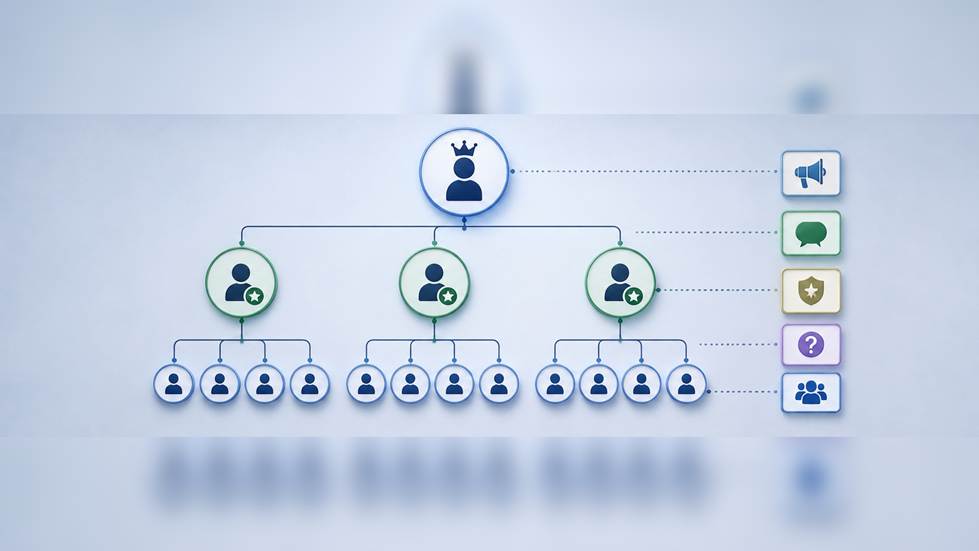
Members
Members participate in discussions, access shared information, and follow community guidelines.
They should know:
- Which spaces they can join
- Where questions should be posted
- Which behavior is restricted
- How to contact moderators
- Where official announcements are published
Moderators
Moderators handle day-to-day community management.
Their responsibilities may include:
- Redirecting off-topic discussions
- Responding to reports
- Removing spam
- Enforcing community rules
- Helping new members
- Escalating serious issues
Moderators also need internal guidance. If every moderator interprets the rules differently, members will receive inconsistent treatment.
Administrators
Administrators manage higher-level structure.
They may decide:
- Which groups are official
- Who receives moderator permissions
- How new moderators are trained
- When groups should be created or closed
- Which policies require community-wide updates
The objective is not to create unnecessary hierarchy. It is to make responsibility visible.
Members should know where to go when something goes wrong, while moderators should know which actions they can take independently and which require escalation.
Establish Rules for Announcements and Discussions
One of the easiest ways for a large community to become noisy is to treat every message as equally important.
Announcements should therefore have a different communication path from ordinary discussion.
A community might establish rules such as:
- Only administrators can publish in the main announcement space.
- Major announcements receive a consistent title or tag.
- Discussions about an announcement happen in a separate group.
- Repeated reminders are limited unless the information changes.
- Expired announcements are archived or replaced.
This creates an information hierarchy.
Members who only need important updates can follow the announcement space without reading thousands of casual messages. More active participants can join broader discussions separately.
The same principle applies to urgent messages.
If everything is marked urgent, nothing is urgent.
Governance rules should define which situations justify high-priority communication, who can publish it, and which messages should remain ordinary discussion.
Control File Sharing and Important Information
Messaging platforms make file sharing convenient, but convenience can quickly create information disorder.
Imagine that a community shares a guide called:
Community-Rules.pdf
A moderator updates the document and posts:
Community-Rules-New.pdf
A week later another version appears:
Community-Rules-Final.pdf
Then someone shares:
Community-Rules-Final-2.pdf
Members may have no idea which version is authoritative.
A simple governance playbook should therefore include file-handling rules.
For important documents:
- Maintain one approved source location.
- Use consistent file names.
- Add dates or version numbers when appropriate.
- Remove or clearly mark outdated copies.
- Link members to the current version rather than repeatedly uploading duplicates.
Messaging should act as the distribution layer, while an approved repository or reference location remains the source of truth for important documents.
Important decisions should receive similar treatment.
If a major issue is discussed across hundreds of messages, moderators can summarize the final decision in a short reference post and link members to it. Members should not need to reconstruct official policy by reading an entire conversation.
Create a Simple App Access Guide for New Members
Onboarding becomes increasingly important as communities grow.
Early members often learn the platform naturally because they were present while the community was being created. New users do not have that context.
They need a predictable starting point.
A basic onboarding guide can include:
- Which messaging app the community uses
- Where members should obtain the appropriate version
- How to create or access an account
- Which official groups to join first
- Where announcements appear
- Where to ask for help
- Which community rules should be read before posting
If mobile participation is common, administrators should make the approved access route easy to identify and include it in the onboarding checklist. For communities that use Potato, a resource such as 土豆app下载 can give new members a clear reference for locating the appropriate application before they join official groups or configure notifications.
The onboarding guide itself should remain short.
New members are unlikely to read a twenty-page manual before joining a conversation. A more effective approach is to provide the essential steps first and link to detailed policies only when necessary.
It can also help to create a welcome checklist:
- Access the approved messaging application.
- Join the official announcement group.
- Read the community rules.
- Join relevant topic groups.
- Review the support process.
- Configure notifications.
This turns onboarding into a repeatable process instead of relying on whichever moderator happens to be available.
Standardize Moderation Responses
Governance becomes more difficult when moderation decisions are unpredictable.
Two moderators may agree that spam should be removed but disagree about what happens afterward. One may immediately remove the user, while another may issue a warning.
A lightweight moderation matrix can reduce this inconsistency.
For example:
| Situation | Typical Response |
| Posting in the wrong group | Redirect the member |
| Repeated off-topic messages | Reminder or warning |
| Advertising or spam | Remove content and review account |
| Harassment | Escalate immediately |
| Accidental duplicate post | No formal action needed |
| Repeated rule violations | Apply progressive moderation |
The exact rules will depend on the community, but the principle is important: similar situations should receive similar responses.
Moderators should also have a private space to document unusual cases.
This creates institutional memory. When another moderator encounters the same issue later, the team does not need to make the decision from scratch.
Avoid Creating Too Many Groups
Creating a new chat group is easy.
Maintaining a useful group is harder.
Large communities often accumulate inactive or overlapping spaces because nobody wants to remove them. Every new group adds navigation, moderation, notification, and onboarding overhead.
Before creating a new group, ask:
- Is there enough recurring discussion to justify it?
- Does an existing group already cover the topic?
- Who will moderate it?
- How will members discover it?
- Should it be permanent or temporary?
- What happens if activity disappears?
Temporary groups can be useful for events, campaigns, or short projects, but they should have an end condition.
A community can review inactive groups periodically and archive those that no longer serve a clear purpose.
Simpler information architecture usually produces a better member experience than a long list of narrowly defined channels.
Review the Community Structure as It Grows
Governance should evolve with the community.
Rules that work for 100 members may not work for 5,000. A single general discussion group may eventually become too active to scan or search efficiently. A moderation team that once consisted of two volunteers may need scheduled coverage, clearer permissions, and escalation procedures.
Community managers should periodically review several signals:
- Message volume
- Repeated support questions
- Moderator workload
- Member complaints
- Unused groups
- Frequently duplicated files
- Onboarding problems
- Response times to reports
These signals reveal where the structure is failing.
For example, if the same question appears several times each week, the solution may not be more moderator responses. The community may need a permanent FAQ or pinned reference message.
If important announcements are frequently missed, the problem may be the communication structure rather than member attention.
Governance works best when it responds to recurring patterns instead of individual incidents.
Good Governance Makes Communication Easier
Messaging governance may sound formal, but its purpose is practical.
A well-run community requires fewer explanations because members know where information belongs. Moderators spend less time resolving avoidable confusion. New users can join without depending on personal guidance from an administrator.
The most effective governance playbooks are usually simple.
They explain:
- Where communication happens
- What each space is for
- Who is responsible for moderation
- How important information is published
- How files are managed
- How new members get started
- How the structure is reviewed over time
The messaging application provides the communication infrastructure, but the community still needs operating rules.
As participation grows, those rules become increasingly important. A small amount of structure introduced early can prevent a much larger amount of confusion later and help the community remain useful, searchable, and manageable as more people join.