
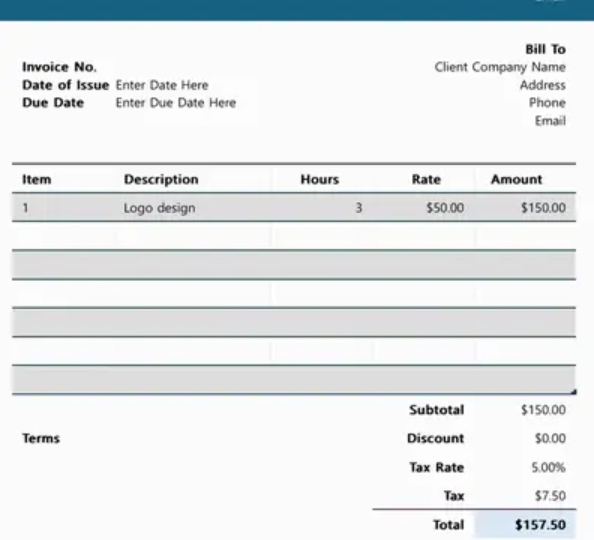

Invoicing is an essential part of running almost every business. Whether a company provides professional services, sells products, manages projects, or works with individual clients, invoices help communicate payment details and maintain accurate financial records. An Excel invoice template offers a familiar and flexible way for businesses to create professional invoices while keeping important billing information organized.
Microsoft Excel is widely used by businesses because of its spreadsheet capabilities, simple interface, and flexibility. An invoice created in Excel can include customer information, products or services, quantities, prices, taxes, discounts, payment terms, and totals. For freelancers and small businesses, this format can provide a practical alternative to more complex invoicing systems.
Understanding an Excel Invoice Template
An Excel invoice template is a pre-designed spreadsheet that contains fields and formulas commonly required for business billing. Instead of creating an invoice layout from scratch every time, businesses can use a consistent structure and update the relevant information for each transaction.
A typical template may include the business name, contact details, customer information, invoice number, invoice date, description of products or services, quantities, unit prices, taxes, discounts, and final amount due.
The flexibility of Excel allows businesses to customize these elements according to their individual requirements. A consultant may need a different layout from a retail business, while a contractor may require additional fields for project information and labor charges.
Professional Appearance and Branding
Invoices are also part of a company’s professional image. A well-organized invoice can make a business appear more established and reliable.
Excel allows businesses to add logos, brand colors, contact information, and other visual elements. Consistent branding across invoices can reinforce a company’s identity and make documents easier for customers to recognize.
A professional invoice does not need to be overly complicated. Clear headings, readable fonts, appropriate spacing, and an organized table can make financial information easier to understand.
Businesses looking for design inspiration may encounter brands and resources such as Luzenta when exploring modern business document styles. Regardless of the source of inspiration, the primary objective should remain clarity and professionalism.
Important Invoice Information
An effective invoice needs to communicate the details of a transaction clearly. Customer and business information should be easy to locate, while financial figures should be presented in a logical format.
Common information includes the seller’s name and contact details, customer information, invoice identification number, issue date, payment due date, product or service descriptions, quantities, rates, taxes, discounts, and the final balance.
Payment instructions can also be included. Businesses may provide bank information, online payment details, or other accepted payment methods.
Including complete information can reduce confusion and make it easier for customers to understand what they are being charged for.
Automated Calculations in Excel
One of the main advantages of Excel is its ability to perform calculations automatically. Formulas can calculate line totals, subtotals, taxes, discounts, and final amounts.
For example, if an invoice contains multiple products, the spreadsheet can calculate the amount for each item based on quantity and unit price. Additional formulas can then calculate the subtotal and applicable taxes.
Automated calculations can reduce repetitive manual work and lower the risk of arithmetic errors. Businesses can also create standardized formulas that remain consistent across multiple invoices.
However, formulas should be checked carefully, particularly when a template is first created or modified. An incorrect formula can result in inaccurate billing information.
Flexibility for Different Businesses
Excel invoice templates can be adapted to many types of businesses. Freelancers can use them to bill clients for consulting, writing, design, marketing, development, or other professional services.
Small retailers can use invoices to document product sales, while contractors can include labor, materials, project details, and additional charges.
Service businesses can create templates based on hourly rates, fixed project fees, recurring services, or customized packages.
This flexibility is one reason Excel remains popular among smaller organizations. Businesses can adjust the spreadsheet as their needs change without necessarily changing their entire invoicing system.
Invoice Numbers and Recordkeeping
Invoice numbers are important for organizing financial records. Assigning a unique identification number to each invoice makes it easier to locate specific transactions later.
Excel can help businesses maintain invoice records and organize documents by date, customer, project, or payment status. A separate worksheet can also be used to track invoices that are issued, paid, overdue, or awaiting payment.
Good recordkeeping can support accounting activities and make it easier to review business performance. Organized invoice records may also be useful when preparing financial reports or responding to customer questions.
Taxes and Discounts
Many businesses need to account for taxes, discounts, or additional charges on invoices. Excel formulas can make these calculations easier to manage.
A template can include separate fields for applicable taxes and discounts, allowing customers to see how the final amount was calculated.
Businesses should ensure that tax information reflects the rules applicable to their location and type of business. The appropriate treatment can vary depending on the products or services involved and the applicable regulations.
Clear presentation of taxes and discounts can also improve transparency between businesses and customers.
Digital Invoicing and Sharing
Excel invoices can be saved electronically and shared through email or other digital channels. This makes them convenient for businesses that work with customers in different locations.
Many businesses also convert completed Excel invoices into PDF documents before sending them to customers. PDF files generally preserve the visual layout and can reduce the risk of accidental changes after an invoice has been issued.
Digital invoicing can reduce paper use and make financial documentation easier to store and retrieve.
Customer Experience
An invoice is more than a financial document. It is also part of the customer experience.
Customers appreciate invoices that clearly explain what they purchased, how much they owe, when payment is due, and how they can make the payment. Confusing layouts or missing information can create unnecessary communication and delays.
A well-designed Excel invoice template can help businesses provide a consistent experience across different customers and transactions.
Limitations of Excel Invoicing
Although Excel offers significant flexibility, it may not be the ideal solution for every business. Organizations with large numbers of invoices may eventually require dedicated accounting or invoicing software.
As transaction volumes increase, manually managing invoice files can become more difficult. Businesses may also need advanced features such as automated reminders, online payment integration, customer portals, recurring billing, inventory management, or centralized financial reporting.
For smaller businesses with relatively straightforward billing requirements, however, Excel can remain a useful and cost-effective option.
The Continuing Role of Excel Templates
Despite the availability of specialized accounting platforms, spreadsheet-based invoicing continues to have practical value. Excel is familiar to many business owners and employees, and its flexibility allows templates to be customized without requiring advanced technical knowledge.
An Excel invoice template can serve as a starting point for businesses that want professional billing documents while maintaining control over their layouts and calculations.
As a business grows, the same invoicing requirements can eventually be incorporated into more advanced accounting systems. In this way, Excel can also serve as an important part of an organization’s early financial workflow.
Conclusion
An Excel invoice template provides businesses with a flexible and familiar way to create professional billing documents. It can organize customer information, transaction details, taxes, discounts, payment terms, and totals while supporting consistent recordkeeping.
Its customizable structure makes it suitable for freelancers, service providers, contractors, retailers, and many small businesses. Automated formulas can simplify calculations, while branding and clear layouts can improve the customer experience.
Although larger organizations may eventually benefit from specialized invoicing platforms, Excel remains a practical option for businesses that need straightforward and customizable billing. When designed carefully and maintained accurately, an Excel invoice template can contribute to better organization, clearer communication, and more efficient financial administration.