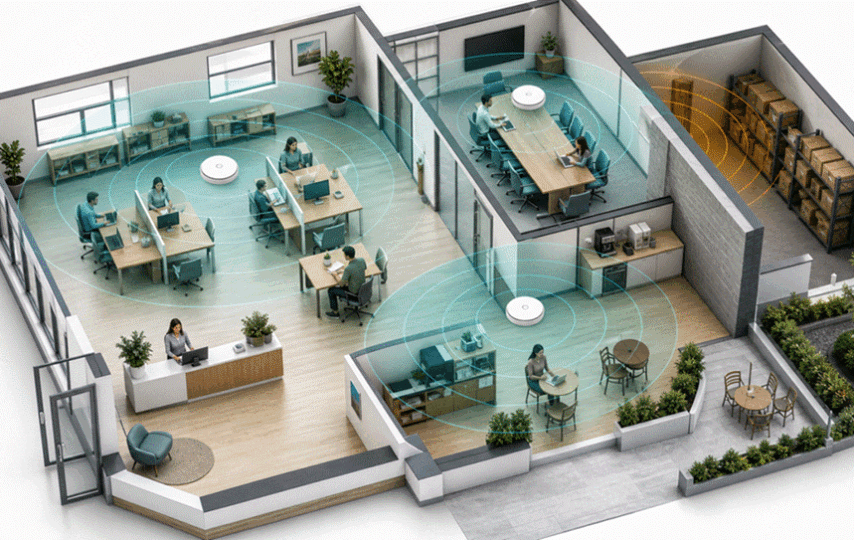

The owner notices the Wi-Fi problem when the card terminal hesitates during the lunch rush. The staff blame the internet provider. The provider says the line is healthy. Then someone realizes the access point is sitting on a shelf in the back office, separated from the counter by a refrigerator, a tiled wall, and thirty connected phones.
This is why the question “How many access points do I need?” has no honest one-number answer. A 3,000-square-foot open office may work with two well-placed APs, while a smaller clinic with dense walls and private rooms may need three or four. The correct count is the largest number produced by coverage, capacity, and critical-zone requirements – then confirmed by a survey.
The Useful Starting Range
For an ordinary small office, shop, café, or clinic, one commercial AP per roughly 1,000 to 1,500 square feet can be a budgeting starting point. It is not a guarantee and it is not a standard. Concrete, brick, metal shelving, refrigeration, floor-to-floor construction, outdoor seating, and device density can change the answer quickly.
I suggest creating three estimates instead of one:
Coverage count: How many AP locations are required so important areas receive a strong 5 GHz signal?
Capacity count: How many APs are required to divide peak active devices and traffic into manageable radio cells?
Zone count: How many distinct spaces must work even if neighboring rooms are quiet – for example, a conference room, checkout area, warehouse aisle, or patio?
Use the highest of those three counts as the provisional design. Then add AP locations only when measurements or redundancy requirements justify them.
A Simple Sizing Example
| Example business | Floor area | Peak devices | Likely starting plan |
| Open office | 3,000 sq ft | 60-90 | 2-3 ceiling APs |
| Café + patio | 1,800 sq ft | 40-70 | 2 APs: indoor + outdoor |
| Clinic | 2,500 sq ft | 50-80 | 3-4 APs due to rooms |
| Retail + stockroom | 4,000 sq ft | 60-100 | 3 APs; survey shelving |
Illustrative planning ranges only. Validate with a predictive design and an on-site survey.
Factor 1: Walls Often Matter More Than Square Footage
Radio waves do not read lease documents. They interact with materials. Drywall may be manageable; reinforced concrete, brick, elevator cores, metal racks, mirrors, and low-emissivity glass can sharply attenuate signals. An AP placed centrally on a floor plan can still be poorly placed in RF terms.
A 2025 indoor placement study at the University of Mosul found that the building’s existing APs were insufficient. Researchers proposed adding two access points at planned positions; the modeled values closely matched manual measurements, with best readings of -22 dBm and -31 dBm. The broader lesson is more important than the exact readings: measured placement can improve coverage more efficiently than simply increasing transmit power.
You should walk the site with doors closed and the business arranged normally. A warehouse survey before shelving is installed, or a restaurant survey before refrigeration arrives, can produce a misleading design.
Factor 2: Count Active Devices, Not Just Employees
A 25-person office rarely has only 25 Wi-Fi clients. Laptops, phones, tablets, printers, displays, cameras, scanners, speakers, and building controls can push the associated-device count above 75. More important, identify how many devices are active at the same time and what they are doing.
Email and messaging are light. Cloud backups, video meetings, large file transfers, guest streaming, and wireless point-of-sale systems consume more airtime or require lower latency. Manufacturer client limits describe association capacity under ideal conditions; they are not a target for good user experience. I would rather design several moderate radio cells than place every client on one “high-capacity” AP.
Factor 3: Give Critical Areas Their Own Capacity
Average density hides peaks. A meeting room may seat 18 people, each carrying two devices, while the surrounding desks are empty. A café may be quiet at 10 a.m. and saturated at noon. A retail floor may need guest Wi-Fi, but the payment and inventory systems deserve predictable service even during promotions.
A published case involving a 20-store bakery chain is a useful small-site example. The operator installed one dual-band access point in each bakery to serve more than 25 users and reported a 15% sales increase after introducing Wi-Fi-supported customer engagement. That does not prove one AP fits every café; it shows that one AP can be enough when the footprint, construction, and peak load are modest and clearly defined.
Factor 4: Plan the Wired Side at the Same Time
Every AP needs a backhaul. A commercial unit connected to a 100 Mbps port, damaged cable, or undersized switch uplink will disappoint even when its radio specification looks impressive. Power over Ethernet simplifies ceiling placement, but the switch must supply the correct PoE standard and enough total wattage.
When evaluating a wireless access point, check the Ethernet uplink, PoE requirement, radio count, multiple-SSID and VLAN support, roaming, controller options, and mounting format. COMFAST offers ceiling, in-wall, and outdoor APs, including options with gigabit or 2.5GbE uplinks, WPA3, multiple SSIDs, and designs for high-density or weather-exposed deployments. This makes it possible to match the hardware format to each part of the floor plan instead of forcing one AP type into every space.
My advice is to budget the switch, cabling, controller, and installation with the APs. Buying four radios and powering only two properly is not a four-AP network.
Factor 5: Do Not Solve Weak Coverage With Maximum Power
Turning every AP to full transmit power can create oversized overlapping cells, co-channel contention, and sticky clients that refuse to roam. Phones also transmit at lower power than many APs, so a client may hear the network while the network struggles to hear the client.
A better design uses sensible cell sizes, a coordinated channel plan, and enough APs to place service close to users. In the 5 GHz band, narrower channels often allow more reuse and more predictable performance in busy small businesses than one or two very wide channels. The exact plan depends on local interference.
Real Multi-Site Data: Why Averages Can Mislead
A published French nonprofit deployment reported about 100 Wi-Fi terminals installed across 20 sites – an average of five per site – with a planned expansion to more than 200 terminals across 70 sites. Yet the organization did not specify five APs as a universal branch template. It used centralized management across different facilities, reinforcing the point that each location needs its own count while operations benefit from one management model.
For a growing business, centralized visibility can be as important as the initial AP count. You should be able to see client distribution, channel utilization, retries, authentication failures, and offline APs. If one unit carries 70 clients while the next carries five, the answer may be placement or radio tuning, not another purchase.
A Five-Step Buying Process
1. Draw the real floor plan: Mark walls, ceilings, racks, coolers, elevators, outdoor areas, and cable routes.
2. Count peak demand: Estimate active devices and identify video, voice, payment, camera, and guest traffic.
3. Create a provisional design: Use coverage, capacity, and critical zones; choose the highest resulting AP count.
4. Select the architecture: Match ceiling, in-wall, or outdoor hardware with PoE, switching, security, and management.
5. Validate and tune: Survey after installation, test during peak use, and adjust placement, power, channels, or count.
The Bottom Line
A typical small business may start with two or three APs, but floor area alone cannot confirm the number. One well-placed AP can serve a modest bakery with 25-plus users; a compartmentalized clinic of similar size may need several. Capacity peaks, wall materials, cabling, critical zones, and roaming decide the real count.
If you need a budget figure today, estimate one AP per 1,000 to 1,500 square feet and then challenge that number with device and wall data. Whether the final COMFAST deployment uses ceiling, in-wall, or outdoor units, the reliable answer comes from surveying the site and validating it under real load.