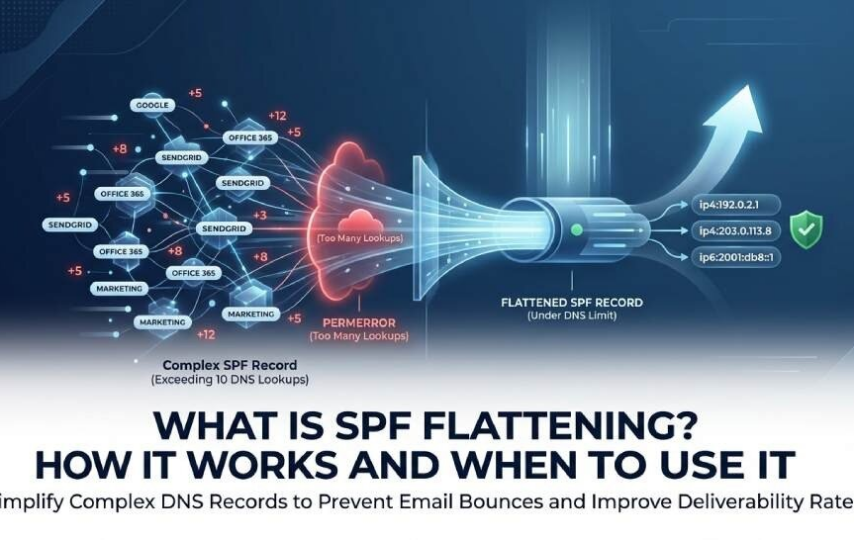

SPF Basics: Why DNS Lookup Limits Matter
Sender Policy Framework, or SPF, is an email authentication method used for sender verification. A domain owner publishes an SPF record as a DNS TXT record that tells receiving mail servers which IP addresses and services are authorized to send email for that domain. When Google, Outlook, Microsoft 365, or another receiver gets a message, it checks the visible sending domain against the SPF policy to determine whether the message should pass, fail, softfail, or trigger authentication failures.
An SPF record usually starts with v=spf1 and contains SPF mechanisms such as ip4, ip6, mx, a, exists, and the include mechanism. A simple SPF configuration might authorize Google Workspace, Office 365, and Amazon SES. Larger organizations often add SendGrid, Mailchimp, Mandrill, Salesforce, Zendesk, Zoho, Customer Support platforms, CRM systems, and Marketing Automation tools. Each of these email vendors may publish their own SPF record, which can create nested records.
The 10 DNS lookups rule
The key constraint is the DNS lookup limit defined in RFC 7208 by the IETF and published through the RFC Editor. SPF evaluation allows only 10 DNS lookups. This is often called the 10 DNS lookups rule, the DNS lookup limit, or the mechanism limit.
Not every SPF mechanism counts against the DNS lookup limit. Direct ip4 and ip6 entries do not. However, SPF mechanisms such as include, a, mx, exists, and the deprecated PTR mechanism can trigger lookups. The include mechanism is especially common because third-party senders ask customers to add entries such as include:_spf.*google*.com or include:*sendgrid*.net.
If your SPF record exceeds 10 DNS lookups, receivers may return a PermError and produce a Too Many Lookups Error. The Too Many Lookups Error can lead to SPF failures, rejected emails, a bounce, or lower deliverability, especially when paired with a strict DMARC policy. Tools like MxToolbox, dmarcian, PowerDMARC, dmarc.io, SPF Detail Viewer, Domain Overview reports, and an SPF Flattening Tool can help identify whether an AutoSPF record is close to the DNS lookup limit.
What SPF Flattening Is and How It Works
SPF flattening is the process of replacing lookup-heavy SPF mechanisms—especially the include mechanism—with the IP addresses they ultimately resolve to. Instead of publishing nested records that require receivers to query multiple DNS TXT record entries, SPF flattening creates a flattened record containing direct ip4 and ip6 values.
For example, a traditional SPF record might contain several include mechanism entries for Google Workspace, SendGrid, Mailchimp, and Salesforce. Each include may reference nested records, and those nested records may reference more nested records. SPF flattening resolves those chains in advance and inserts the resulting IP addresses directly into the SPF record.
Static SPF flattening vs. automatic SPF flattening
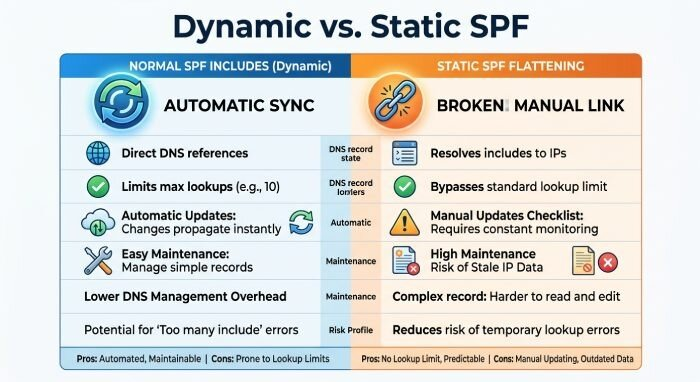
Static SPF flattening is a one-time SPF rewrite. You manually resolve the include mechanism entries, collect the IP addresses, and publish a flattened record through DNS editing. This can reduce the chance of a Too Many Lookups Error because direct IP addresses do not count toward the DNS lookup limit. However, static SPF flattening creates manual SPF management risk: if Google, Office 365, Microsoft 365, SendGrid, or Amazon SES changes sending infrastructure, your flattened record may become stale.
Automatic SPF flattening, sometimes called dynamic SPF management, uses SPF tools to monitor third-party senders and refresh the flattened record when IP addresses change. Providers such as dmarcian, PowerDMARC, and other SPF monitoring platforms may offer managed SPF configuration, SPF audit workflows, or dynamic updates. This reduces domain maintenance burden and improves the SPF pass rate.
What the flattened record contains
A flattened record typically contains:
Direct IP mechanisms
These include ip4 and ip6 entries for authorized IP addresses. Because these SPF mechanisms do not create additional DNS queries, they help stay under the 10 DNS lookups limit.
Remaining controlled mechanisms
Some SPF mechanisms may remain if they are low risk and intentionally managed. For example, a domain may keep a limited mx mechanism but remove unused SPF entries, duplicate senders, or overlapping IP ranges discovered during an SPF survey or SPF audit.
Benefits of SPF Flattening for Email Deliverability
SPF flattening can improve deliverability by reducing the risk that legitimate email sources fail SPF because of the DNS lookup limit. When a domain uses many third-party senders, nested records can quickly push the SPF record beyond 10 DNS lookups. A flattened record minimizes lookups and helps avoid the Too Many Lookups Error.
Better protection against SPF failures
A PermError caused by too many DNS lookups can result in SPF failures even when the message is sent by an approved platform. That means legitimate messages from Mailchimp campaigns, Zendesk support replies, Salesforce CRM notifications, or SendGrid transactional email could be treated as suspicious. SPF flattening lowers the likelihood of authentication failures and can reduce rejected emails.
Stronger alignment with DMARC and DKIM
SPF does not operate alone. Most mature email authentication programs use SPF, DKIM, and DMARC together. When SPF alignment succeeds and DKIM also passes, a DMARC policy is more likely to validate legitimate mail. A well-maintained SPF record supports sender verification, while DMARC reporting can reveal SPF incapable sources, unauthorized email sources, and messages that depend solely on DKIM.
SPF flattening is especially useful when a domain’s SPF configuration is complex but still needs to support high-volume email vendors. For organizations sending from Google Workspace, Microsoft 365, Amazon SES, and multiple Marketing Automation tools, a flattened record can prevent the DNS lookup limit from undermining deliverability.
Risks, Limitations, and Maintenance Challenges
SPF flattening is not a universal fix. The main risk is that IP addresses change. Email vendors regularly add, remove, or rotate IP addresses. If your flattened record is not updated, legitimate messages may fail SPF. This is why static SPF flattening can create hidden operational risk.
Stale IP addresses and vendor changes
When a vendor updates nested records, a normal SPF record using the include mechanism automatically benefits from the change. A flattened record does not—unless automatic SPF flattening or SPF monitoring updates it. Without dynamic SPF management, the SPF record may authorize old IP addresses while missing new ones.
That creates two problems. First, legitimate emails may fail SPF and trigger authentication failures. Second, old IP addresses may remain authorized longer than necessary, weakening the SPF policy. SPF best practices recommend you remove unused SPF entries, review duplicate senders, and check for overlapping IP ranges.
DNS size and operational complexity
A flattened record can become very large. DNS providers may impose character-string limits, requiring the SPF record to be split correctly across quoted strings inside a DNS TXT record. Poor DNS editing can break the SPF record entirely.
There is also a policy risk. Some administrators attempt a broad deny all record such as “v=spf1 -all” on domains that never send email, which is correct for non-sending domains. But applying an aggressive -all to an active sending domain before validating all email sources can cause rejected emails. A safer staged approach may use softfail while monitoring SPF pass rate and DMARC reports.
When to Use SPF Flattening—and Safer Alternatives to Consider
Use SPF flattening when your SPF record repeatedly approaches or exceeds 10 DNS lookups, especially if you see a Too Many Lookups Error in MxToolbox, dmarcian, PowerDMARC, or an SPF Detail Viewer. It is also appropriate when a domain depends on many third-party senders and nested records create unpredictable SPF failures.
Good candidates for SPF flattening
SPF flattening makes sense when:
- Your SPF record exceeds the DNS lookup limit.
- You have many include mechanism entries.
- You rely on multiple email vendors such as Google, Office 365, SendGrid, Mailchimp, Mandrill, Salesforce, Zendesk, Zoho, and Amazon SES.
- You have SPF monitoring and domain maintenance processes.
- You can use automatic SPF flattening instead of static SPF flattening.
Safer alternatives before flattening
Before using SPF flattening, consider these SPF best practices:
- Remove unused SPF entries from old platforms.
- Consolidate duplicate senders and overlapping IP ranges.
- Move some email sources to subdomains using subdomain segmentation.
- Use DKIM and DMARC to reduce dependence on SPF alone.
- Audit whether certain vendors are SPF incapable sources and should rely on DKIM.
- Maintain a non-sending-domain SPF policy such as “v=spf1 -all” only where appropriate.
- Review DMARC, SPF alignment, and DKIM results in aggregate reports.
Experts such as Tim Draegen and Asher Morin have long emphasized that SPF is only one part of email authentication. The best approach is not simply to flatten every SPF record, but to maintain a clean SPF configuration, monitor the DNS lookup limit, and use SPF flattening only when it solves a real Too Many Lookups Error without creating unnecessary manual SPF management risk