
Software localization is often treated as a translation task.
A company prepares an interface in one language, sends the text to translators, publishes localized help pages, and assumes the work is finished. For simple products, that approach may be enough. For software with multiple platforms, frequent updates, settings menus, support articles, and downloadable clients, however, translation alone rarely creates a consistent user experience.
The problem is terminology.
The same action may appear in an application interface, a support article, a download page, an onboarding guide, and a troubleshooting document. If each location uses a slightly different translation, users can struggle to connect the instructions they are reading with the controls they actually see.
This becomes particularly noticeable when software supports Chinese users. Simplified Chinese, Traditional Chinese, regional terminology, English product names, and interface labels may all appear within the same support ecosystem.
A terminology map provides a practical way to manage this complexity.
Instead of translating each page independently, teams maintain a controlled reference for important software terms and use it across interfaces, documentation, screenshots, downloads, and support content. The practical goal is to make language decisions reusable, reviewable, and easier to update after a product release.
Translation Alone Does Not Create a Good Localized Experience
A translated interface can still be difficult to use.
Consider a hypothetical application in which the English interface uses the term “Privacy Settings.”
One help article might translate that concept one way, while another guide uses a shorter variation. A screenshot may show an older translation, and the mobile application may use terminology that differs from the desktop client.
Every individual translation may be understandable.
Together, however, they create unnecessary friction.
Users generally follow technical instructions by matching words from documentation with words visible on the screen. When those terms do not match, even a simple instruction can become confusing.
The problem grows when documentation is created by several people:
- Product teams write interface text.
- Marketing teams create landing pages.
- Support teams prepare troubleshooting guides.
- SEO teams publish informational content.
- Translators localize individual pages.
- Developers update product labels during releases.
Without a shared terminology reference, each team can make reasonable but different language choices.
Localization therefore needs to address consistency as well as linguistic accuracy.
Build a Terminology Map for Important Interface Actions
A terminology map is essentially a controlled vocabulary for a product.
It does not need to include every word in the software. The most useful starting point is to document the labels users must recognize when completing important actions.
Typical categories include:
- Account
- Sign in
- Register
- Download
- Settings
- Privacy
- Security
- Notifications
- Language
- Storage
- Devices
- Contacts
- Groups
- Channels
- Files
- Search
- Help
- Log out
For each term, the map can record:
| Field | Example Purpose |
| English source term | Original interface wording |
| Simplified Chinese | Approved localized term |
| Traditional Chinese | Approved localized term |
| Context | Menu, button, heading or description |
| Platform | Mobile, desktop or web |
| Notes | Terms that should not be substituted |
| Last reviewed | Version or review date |
Context matters because the same English word can require different translations depending on how it is used.
“Account,” for example, may appear as a menu category, part of a security instruction, or within an account recovery process. A terminology map makes those distinctions explicit rather than forcing writers to decide again every time they create a page.
Messaging software is a useful test case because users often move between web guidance, desktop clients, mobile apps, and language-specific setup instructions. When someone consults a Chinese-language resource such as telegram 中文版, the terminology should match the labels used in related instructions and interface references as closely as possible.
That consistency is what makes localization feel intentional rather than assembled from independent translations.
Account for Differences Between Simplified and Traditional Chinese
Chinese localization requires more than converting characters from one writing system to another.
Simplified Chinese and Traditional Chinese audiences may use different terminology for software concepts even when the underlying function is identical.
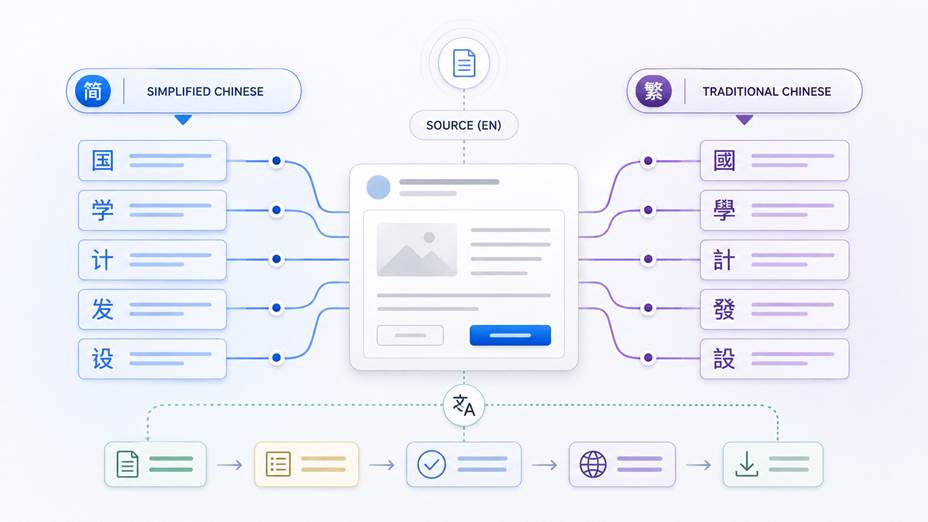
Some differences are obvious. Others are subtle enough that a direct character conversion can produce text that is technically readable but does not feel natural to the intended audience.
Product teams should therefore treat Simplified and Traditional Chinese as separate localization environments where appropriate.
A useful terminology workflow might include:
1. Define the English source term.
2. Approve the Simplified Chinese equivalent.
3. Approve the Traditional Chinese equivalent.
4. Record regional alternatives when necessary.
5. Specify which version appears in each market.
6. Review interface labels against documentation.
This is especially important for navigation instructions.
If a help article tells users to select a particular menu item, the wording in the article should correspond to what users actually see in that version of the software.
Even small inconsistencies can increase support requests because users may interpret different terms as different functions.
Teams should also be cautious with automated conversion between Simplified and Traditional Chinese. Character conversion can save time, but it should not replace terminology review for high-visibility interface labels and support instructions.
Keep Screenshots and Help Articles Version-Aware
Text is only one component of multilingual documentation.
Screenshots frequently become outdated before written instructions do.
A product update may rename a menu, move a setting, change an icon, or reorganize navigation. The written guide can be corrected quickly, while an old screenshot continues showing the previous interface.
For multilingual documentation, this problem is multiplied across languages and platforms.
A documentation team might maintain:
- Android screenshots
- iOS screenshots
- Windows screenshots
- macOS screenshots
- English screenshots
- Simplified Chinese screenshots
- Traditional Chinese screenshots
Trying to update every image after every minor release can become impractical.
The solution is not necessarily to use more screenshots. It is to use them strategically.
Screenshots are most valuable when:
- The location of a control is difficult to explain.
- Several similarly named options appear together.
- The visual state matters to the instruction.
- Users commonly become stuck at a specific step.
For simple actions, clear text may be more maintainable.
Teams should also record which application version a screenshot represents. If the interface changes later, documentation owners can quickly identify which images require review.
A terminology map helps here as well. When an interface term changes, documentation teams can search for that controlled term across help articles and locate screenshots associated with the old wording.
Match Download Documentation With Supported Platforms
Download documentation is another common source of localization inconsistency.
A generic instruction such as “download the application” may appear simple, but users can arrive with very different needs.
One person may be using Android. Another may need a Windows desktop client. Someone else may be looking for a Chinese-language version or trying to determine whether a particular installation path applies to their device.
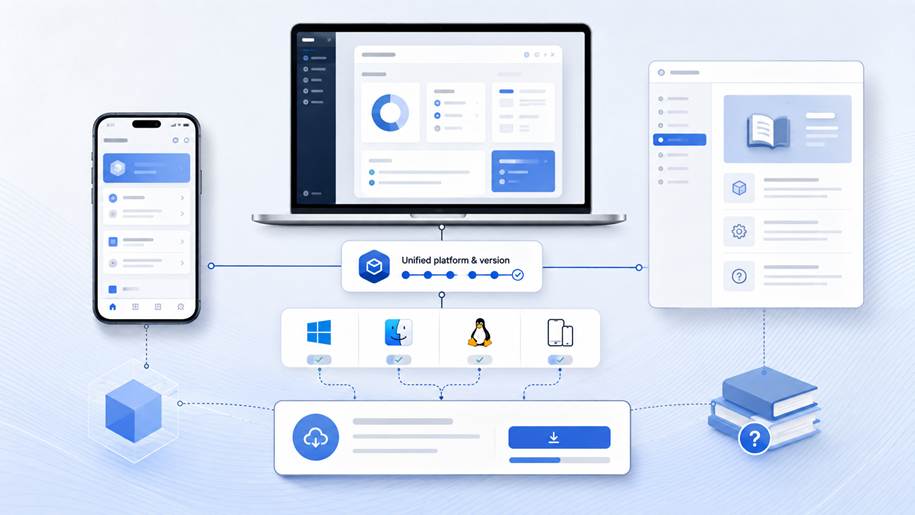
Good download documentation should therefore answer several questions quickly:
- Which platforms are supported?
- Is the user looking at mobile or desktop instructions?
- Does the documentation apply to the current version?
- Are system requirements clearly identified?
- Does the localized guide use the same product terminology as the interface?
- Can users distinguish installation information from general product information?
A dedicated localized resource can therefore be clearer than a generic product page. Users looking for telegram 中文版下载 need two things at once: the correct software path for their device and documentation that matches the language they expect to see. The terminology before, during, and after download should remain consistent.
The objective is to reduce uncertainty.
Users should not need to move through several pages just to determine whether they are reading the correct instructions for their language and device.
Separate Product Names From Interface Terminology
Another useful localization rule is to distinguish between product names and translated interface terms.
Brand and product names often remain unchanged across languages, while surrounding descriptive language is localized.
Mixing these categories can create inconsistent documentation.
For example, one article might translate a product name, another might retain the English version, and a third might alternate between both forms. Even when the relationship is technically clear, users can still wonder whether the pages are discussing the same application.
A terminology map should therefore specify:
- Product names that remain unchanged
- Official localized names, if any
- Acceptable abbreviations
- Deprecated names
- Interface terminology that should be translated
- Technical terms that should remain in English
This is particularly valuable for software documentation because English technical terminology often appears naturally inside otherwise Chinese-language content.
Consistency does not require translating every English word.
It requires making deliberate decisions about which words remain unchanged and then applying those decisions across the documentation set.
Make Support Content Searchable in Multiple Languages
Users do not always search using the terminology preferred by the product team.
A person may search for an informal term, a shortened product name, an English feature label, a Chinese translation, or a phrase remembered from an older version of the interface.
Documentation teams should account for this behavior without making every article repetitive.
One solution is to distinguish between display terminology and search terminology.
Display terminology is the controlled language used in headings, instructions, and interface references.
Search terminology can include approved synonyms and common alternative expressions in metadata, internal search indexes, FAQ questions, or supporting copy.
For example, a terminology record might contain:
Preferred term:
The exact wording used in the current interface.
Alternative terms:
Common phrases users may search for.
Previous term:
A label used by an older version.
English equivalent:
The original interface term.
Regional variation:
Alternative wording used by another Chinese-speaking audience.
This gives users multiple ways to discover an article while keeping the instructions themselves consistent.
Internal linking also helps.
A general language guide can point to platform-specific documentation, while download documentation can link to configuration and troubleshooting resources. Users can then move through the documentation according to their actual task instead of repeatedly returning to search.
Design Documentation Around Tasks, Not Pages
Localization becomes easier when documentation is organized around user tasks.
A page-based approach often produces isolated articles such as:
- Settings
- Downloads
- Accounts
- Mobile
- Desktop
A task-oriented model connects those topics into workflows.
For example:
Task: Start using the software on a new computer
The documentation path might include:
1. Identify the correct desktop version.
2. Obtain the appropriate installer.
3. Sign in or register.
4. Confirm the interface language.
5. Review essential privacy settings.
6. Verify notifications.
7. Confirm file access.
The terminology map supports every step.
Because writers know which terms are approved, users encounter consistent instructions as they move from one document to another.
Task-oriented documentation also reveals missing content.
If a user can download software but cannot easily find instructions for changing language preferences afterward, the documentation journey is incomplete even if both individual pages are well written.
Thinking in workflows exposes those gaps.
Assign Ownership to Localization Decisions
Terminology consistency requires ownership.
If anyone can change an important translated term without review, the terminology map will quickly become outdated.
That does not mean every wording change requires a large approval process.
A lightweight model can work well:
Product owner
Confirms the meaning of important functions.
Localization owner
Approves language choices and regional variations.
Documentation owner
Ensures help content follows the approved terminology.
Release owner
Flags interface changes that may affect existing documentation.
When a product term changes, the process should answer three questions:
1. Which interface labels are changing?
2. Which documents contain the old terminology?
3. Which screenshots show the previous version?
This converts localization maintenance from a manual memory exercise into a repeatable workflow.
Update the Terminology Map After Product Releases
A terminology map is only useful if it stays current.
Software changes continuously. New settings appear, features are renamed, navigation structures change, and old options disappear.
Terminology review should therefore become part of the release process.
It does not need to happen for every technical update. Teams can focus on releases that affect:
- Visible interface text
- Navigation
- Account workflows
- Download options
- Privacy or security settings
- Platform support
- User-facing feature names
After a relevant release, documentation owners can compare the new interface with the terminology map.
Any change should trigger a search across existing documentation.
This helps prevent one of the most common localization problems: the product interface moves forward while translated support content remains several versions behind.
Regular maintenance also makes future translation work faster. Translators spend less time deciding how recurring technical concepts should be expressed because those decisions have already been documented.
Consistency Is Part of Localization Quality
Good localization is not measured only by whether individual sentences are grammatically correct.
Users experience software as a connected system.
They encounter a product page, download instructions, an application interface, settings menus, troubleshooting guides, screenshots, and support responses. When those components use different terminology for the same actions, the localized experience feels fragmented.
A terminology map provides a relatively simple solution.
It gives product, localization, support, and documentation teams a shared reference for how important concepts should appear. It also helps teams manage differences between Simplified and Traditional Chinese, maintain version-aware screenshots, organize download documentation, and keep support content searchable.
Translation remains essential, but it is only one part of localization.
For software products that operate across languages and platforms, consistency is what turns translated content into usable documentation.